

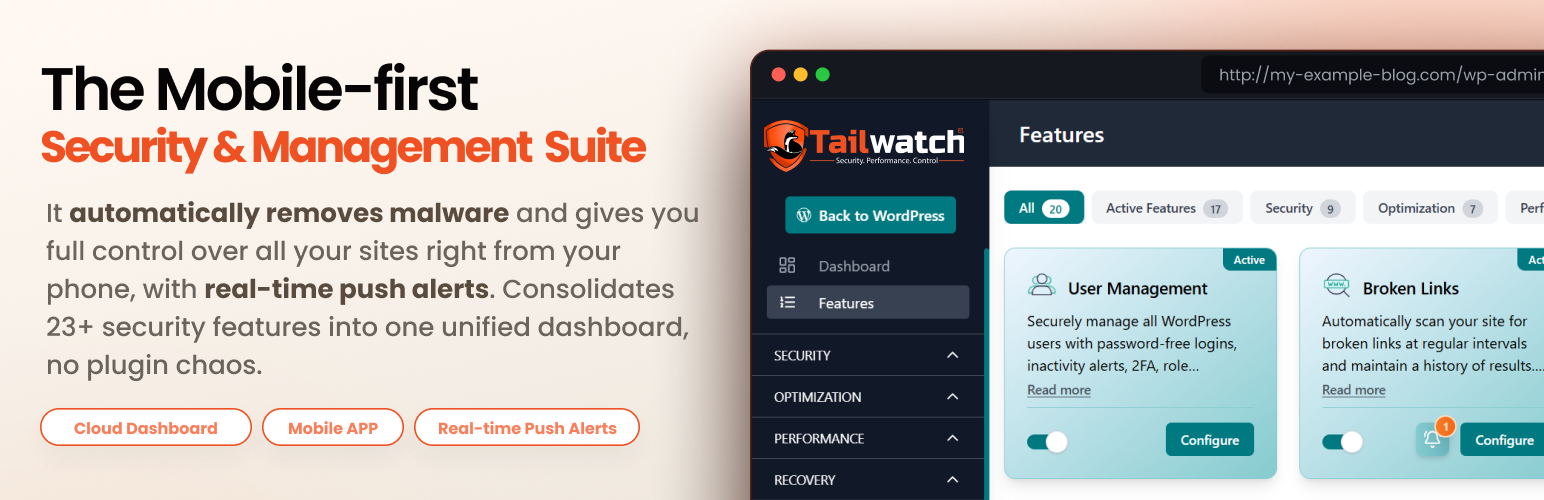

Tailwatch – Security, Backups, Monitoring & Management
Tailwatch is a WordPress security and site management plugin that gives you real-time visibility into what is happening on your website.
It combines security, monitoring, and backups into one lightweight system, managed from your WordPress dashboard. Optionally connect a free Tailwatch account to receive event-based push notifications so you stay informed wherever you are.
Core Features
- Activity Logs (logins, failed logins, registrations, password resets)
- HTTP Error Logs (4xx / 5xx monitoring)
- Email / SMTP Logging with custom SMTP server support
- Security Hardening Audit
- File & Permission Protection
- Smart SSL Monitoring & Expiry Alerts
- File Integrity Monitoring (baseline + change detection)
- Full Site Backups (files and database)
- Search & Replace (safe database-wide updates with serialized data handling)
- Content Restrictions (browser-level protection controls like copy/inspect restrictions)
- Database Optimization Tools
- Broken Link Scanner
- Cron Job Manager
- 301 Redirect Manager
- User Management (create, edit, delete users and manage roles)
- Login Defender (IP-based brute-force protection: failed-login throttling, automatic temporary lockouts, configurable retention)
- Geo-blocking (allow/block individual IPs or IP ranges; whitelist trusted IPs to bypass restrictions)
- Username Hardening (audits for common high-risk usernames such as admin and administrator)
- Process Monitoring & Recovery (detect stuck long-running tasks and re-schedule them)
- Disk Space Monitoring
- Event-based Push Notifications
Notifications
Once connected to a free Tailwatch account, your site can send event-based push notifications for:
- Login activity (logins, failed logins, registrations, password resets)
- Backup completion and backup failures
- File integrity changes (added, modified, deleted files)
- SSL expiry alerts and certificate status changes
- Security Hardening Audit results (scan completed, issues detected)
- Security feature configuration changes
- Search & Replace completion results
- HTTP error spikes (4xx / 5xx monitoring)
- Database optimization results
- Broken link scan results
- Cron job failures
- Email delivery (success or failed)
- Login Defender events (IPs blocked after repeated failed logins, brute-force attempts detected)
Notifications are delivered to the Tailwatch mobile app using Firebase Cloud Messaging (FCM), routed through api.wptailwatch.com (the plugin does not contact Firebase directly).
Tailwatch Pro
Tailwatch Pro extends the free version with:
- Malware Guard (cloud malware scanning, suspicious file detection, cleanup, and push alerts for risk-detection events)
- Country blocking (allow or block visitors by country, applied to login forms or your entire site)
- Role-based Two-Factor Authentication (2FA)
- Advanced User Management (account-expiry rules, “login as another user”, per-user 2FA status surfaced in the user list)
- Expanded notification credits
- Advanced scheduling controls for backups and maintenance tasks
- Priority support
External Services
This plugin connects to several external services. Each service, the data sent, and the conditions under which the connection is made are listed below. Most connections only occur when the corresponding optional feature is enabled by the site administrator.
Tailwatch API (api.wptailwatch.com)
Used for license verification, push notification delivery, and optional deactivation feedback submission. License verification and push notification delivery are active only after you connect a free Tailwatch account from the plugin’s License screen. The deactivation feedback submission is independent of any account connection and is sent only if you voluntarily submit it (see below).
What is sent and when:
– License verification: your anonymized Tailwatch user identifier and your site URL (query string), plus an X-Tailwatch-Header-Key request header containing the license credential issued when you connected your account. Sent on dashboard visits (throttled by a short server-side cache) and on demand when you click “Verify License”. No system metadata is included in this request;
– Mobile push notifications: anonymized user identifier, your site domain, and the notification type/severity tag (the plugin no longer sends a pre-written title or body; the Tailwatch service composes those from the event context below, and the request goes to a single relay endpoint authenticated with a per-site routing token request header). When mobile notifications are enabled, an additional event-context payload is also stored on api.wptailwatch.com so the mobile app can render notification details when you tap a push. This event-context payload contains: the event name and feature, the action and any state-change narrative (before/after) describing what occurred, the timestamp, the requesting admin’s own forensic baseline (IP address and user agent at the time of the event), and per-event fields needed for the mobile app’s detail view (for example, for Email / SMTP events the recipient address and subject line so the notification is actionable). It does NOT include message bodies, credentials, tokens, license keys, or any other secret. The event-context payload is held on api.wptailwatch.com only; it is NOT forwarded to Firebase Cloud Messaging (see below) — Firebase only ever receives the slim title/body/type payload.
– Deactivation feedback: site domain, deactivation reason, plugin version, your “keep data / delete data” choice from the deactivation modal, and optional free-form comments — sent only if you voluntarily click “Submit & Deactivate” (the “Skip & Deactivate” button avoids any transmission).
Service provider: WP Tailwatch
Privacy policy: https://wptailwatch.com/privacy-policy
Terms: https://wptailwatch.com/terms-of-services
Tailwatch Dashboard (dashboard.wptailwatch.com)
The central web dashboard you use to connect your site and manage your account. The browser opens dashboard.wptailwatch.com only when you click “Connect License”.
What is sent: your site URL and environment type (staging or production) are passed via URL parameters when you initiate the connection flow. License information is retrieved and stored in your WordPress database after you log in to the dashboard.
Service provider: WP Tailwatch
Privacy policy: https://wptailwatch.com/privacy-policy
Terms: https://wptailwatch.com/terms-of-services
Firebase Cloud Messaging (fcm.googleapis.com)
Used to deliver mobile push notifications to your paired mobile devices. Only active when (a) you have connected a Tailwatch account, (b) you have enabled mobile notifications in plugin settings, and (c) you have toggled on the specific per-feature notification.
What is sent: an anonymized device token and the notification payload (title, body, type tag) — routed via api.wptailwatch.com to Firebase Cloud Messaging for delivery to your paired device.
Service provider: Google LLC
Privacy policy: https://firebase.google.com/support/privacy
Terms: https://firebase.google.com/terms
Smart SSL Monitoring — host certificate inspection
The Smart SSL feature opens a TLS connection (raw socket) to your own site’s domain (derived from your WordPress Site Address / home_url()) to read its certificate metadata (issuer, validity dates, chain). It also issues an HTTP HEAD probe over plain HTTP to your own site to detect HTTPHTTPS redirection behaviour. Only your own site is contacted — Tailwatch does not connect to any third-party service for this purpose. Disable the Smart SSL feature in plugin settings if you do not want these requests issued.
Broken Link Checker — external URL scanning
The Broken Links scanner contacts URLs that you (or your site’s authors) have placed in your post content, pages, term descriptions, user meta, and options. The plugin issues GET requests to those URLs to determine whether they return 4xx or 5xx errors. The set of URLs contacted is therefore controlled entirely by your own site content — Tailwatch does not maintain a list of external services for this purpose. Disable the Broken Links feature in plugin settings if you do not want these requests issued.
Third-Party Libraries
Bundled PHP libraries
Tailwatch bundles the following open-source PHP libraries. They run entirely on your server and are GPLv2-compatible.
- MaxMind GeoIP2 PHP API + MaxMind-DB Reader — reads a GeoLite2-Country database that you supply (by uploading it to your site’s uploads directory) to resolve visitor IPs to a country for the IP Management / Login Defender geolocation feature. Runs under the
Tailwatch\Vendor\MaxMind\*namespace. Source: https://github.com/maxmind/GeoIP2-php and https://github.com/maxmind/MaxMind-DB-Reader-php — License: Apache-2.0 (full text inVendor/MaxMind/LICENSE)
All server-side HTTP requests use WordPress core’s built-in HTTP API (wp_remote_get / wp_remote_post / wp_remote_head). No external PHP HTTP client libraries (e.g. Guzzle) are bundled.
Bundled JavaScript libraries
The plugin’s admin dashboard is a React single-page application. Its compiled bundle in Admin/View/Static/js/ and Admin/View/Static/css/ is built from the following open-source libraries, all of which are GPLv2-compatible:
- React + ReactDOM (UI framework) — https://react.dev — License: MIT
- Redux, Redux Toolkit, and React-Redux (state management) — https://redux.js.org — License: MIT
- React Router (react-router-dom) (client-side routing) — https://reactrouter.com — License: MIT
- React Hook Form (form state and validation) — https://react-hook-form.com — License: MIT
- Axios (HTTP client) — https://github.com/axios/axios — License: MIT
- SweetAlert2 (modal dialogs) — https://sweetalert2.github.io — License: MIT
- Recharts and react-d3-speedometer (charts and gauges) — https://recharts.org — License: MIT
- @tanstack/react-virtual (long-list virtualization) — https://tanstack.com/virtual — License: MIT
- react-loading-skeleton, react-top-loading-bar, and @ramonak/react-progress-bar (loading indicators) — License: MIT
- react-hot-toast and react-toastify (toast notifications) — License: MIT
- react-tooltip (tooltips) — https://react-tooltip.com — License: MIT
- react-slick + slick-carousel (carousels) — https://react-slick.neostack.com — License: MIT
- lucide-react (License: ISC) and react-icons (License: MIT) — icon sets
- @uppy/core (file selection) — https://uppy.io — License: MIT
- file-saver (client-side file downloads) — https://github.com/eligrey/FileSaver.js — License: MIT
- i18n-iso-countries and countries-list (country names and metadata for country name and flag display) — License: MIT
- DOMPurify (HTML sanitisation for user-supplied strings rendered in the dashboard) — https://github.com/cure53/DOMPurify — License: Apache-2.0 / MPL-2.0
- prop-types (runtime prop checks) — https://github.com/facebook/prop-types — License: MIT
- classnames (conditional CSS class-name joining) — https://github.com/JedWatson/classnames — License: MIT
- decimal.js-light (arbitrary-precision decimal math used by the charts) — https://github.com/MikeMcl/decimal.js-light — License: MIT
- Tailwind CSS (utility-first styling) — https://tailwindcss.com — License: MIT
Bundled font
- Noto Color Emoji (flags-only subset) — a small subset containing only country-flag glyphs, bundled in
Admin/View/Static/fonts/so country flag emoji render consistently across platforms, including Windows (whose system emoji font omits flag glyphs). Source: https://github.com/googlefonts/noto-emoji — License: SIL Open Font License 1.1 (full text inAdmin/View/Static/fonts/OFL.txt).
No JavaScript library is loaded from a remote CDN at runtime; the bundle is served entirely from the plugin directory.
Privacy Policy
Tailwatch stores all logs and operational data locally in your WordPress database (custom tables {prefix}tw_settings, {prefix}tw_logs, {prefix}tw_filemon_baseline, and {prefix}tw_filemon_scans) and on disk under uploads/tailwatch/tailwatch-logs/ (logs and generated data) and wp-content/tailwatch/tailwatch-backup/ (backup archives). Both directories are sealed with deny files (.htaccess, index.php, web.config) so their contents are not reachable over the web.
Data stored locally:
– Activity logs — login/logout events, failed login attempts (including the username submitted and the originating IP address), registrations, password reset events
– HTTP error logs — 4xx / 5xx responses captured during the request lifecycle
– Email logs — SMTP send results for outbound site mail
– Backup metadata — backup catalogue entries (filenames, sizes, timestamps); the actual archives live in wp-content/tailwatch/tailwatch-backup/
– File integrity baselines — file path + hash snapshots used to detect added / modified / deleted files
– Broken link / redirection records — URLs detected on your site and any redirects you have configured
– System configuration data — every plugin feature toggle, schedule, and threshold lives in {prefix}tw_settings
– Client IP addresses — captured for security-relevant events (failed logins, rate-limited requests, redirection hits) so the dashboard and audit trail can show where the event came from
– Login Defender state — IP addresses temporarily locked out after repeated failed logins, throttling counters, and the per-IP activity history that drives the lockout decisions
– Geo-blocking lists — IPs and IP ranges you have explicitly allow-listed or block-listed via the Geo-blocking screen, plus the timestamp and admin who created each rule
– Visit / usage telemetry — a local-only counter in the tailwatch_visit_data option, used to drive in-dashboard onboarding hints; never transmitted
No user data, logs, or PII is transmitted to external servers unless an optional feature is explicitly enabled by the site administrator. The full list of outbound transmissions is documented in the “External Services” section above.
Source Code
Tailwatch is 100% open source and distributed under GPL-2.0-or-later. The
complete, human-readable source code — including the React source and the
Create React App / Webpack build tooling used to produce the admin dashboard
bundle that ships with this plugin — is publicly available at:
https://github.com/tailwatch/tailwatch
The React source for the admin dashboard lives under admin-app/ in that
repository. To reproduce the compiled bundle that ships in this plugin, from
the repository root:
npm run build
That installs the pinned dependencies, builds the React app, and copies the
compiled bundle into Admin/View/Static/. Prerequisites are Node.js 20 or
later and npm 10 or later. Full reproducibility notes — the exact Node/npm
versions used for the shipped build, every runtime dependency, and its
license — are documented in README.md at the repository root.
Bug reports and pull requests are welcome via GitHub Issues:
https://github.com/tailwatch/tailwatch/issues
Details


Related plugins
Plugins that also contain the tag audit-log
Simple History – Track, Log, and Audit WordPress Changes

Activity Log – Monitor & Record User Changes

WP Admin Audit

Logify WP – Activity Log & User Audit Log

LogDash Activity Log

Noti – Activity Notification


About
Plugin for that tries to help you find the WordPress plugin you are looking for.
| Please enjoy an image of Crush (this awesome turtle) and have a lovely day! |  |
We do not own any plugin listed on this site and do not work for or work with WordPress.com or it's associated companies. We simply provide a searchable list of the available WordPress plugins.