



threadi Now Pages
Your website tells visitors who you are and how to reach you. But what are you up to these days?
That’s what a Now page answers: one page – usually at /now – about what matters in your life at the moment. Training for a half-marathon, hiking every weekend, a new dance class, last week’s concert, life with a newborn, planning a wedding. The things you would tell a friend you haven’t seen in a year.
The idea comes from Derek Sivers, who started the first Now page in 2015. Since then, countless personal websites have followed his example.
Why a Now page and not just social media?
Social media captures single moments and lets them disappear in the feed. A Now page shows the big picture – in one place, on your own website, readable for everyone without an account.
The catch: a Now page is only worth something while it’s current. Updated by hand, it is outdated within weeks.
Now Pages keeps it current for you. It collects what you already share elsewhere, adds the things you do regularly, and turns everything into a readable Now page – automatically, every hour.
Up and running in two minutes
- Install and activate the plugin.
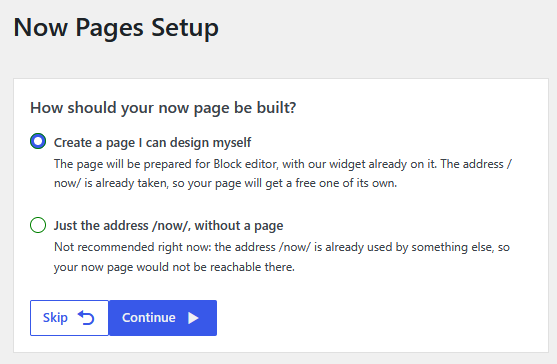
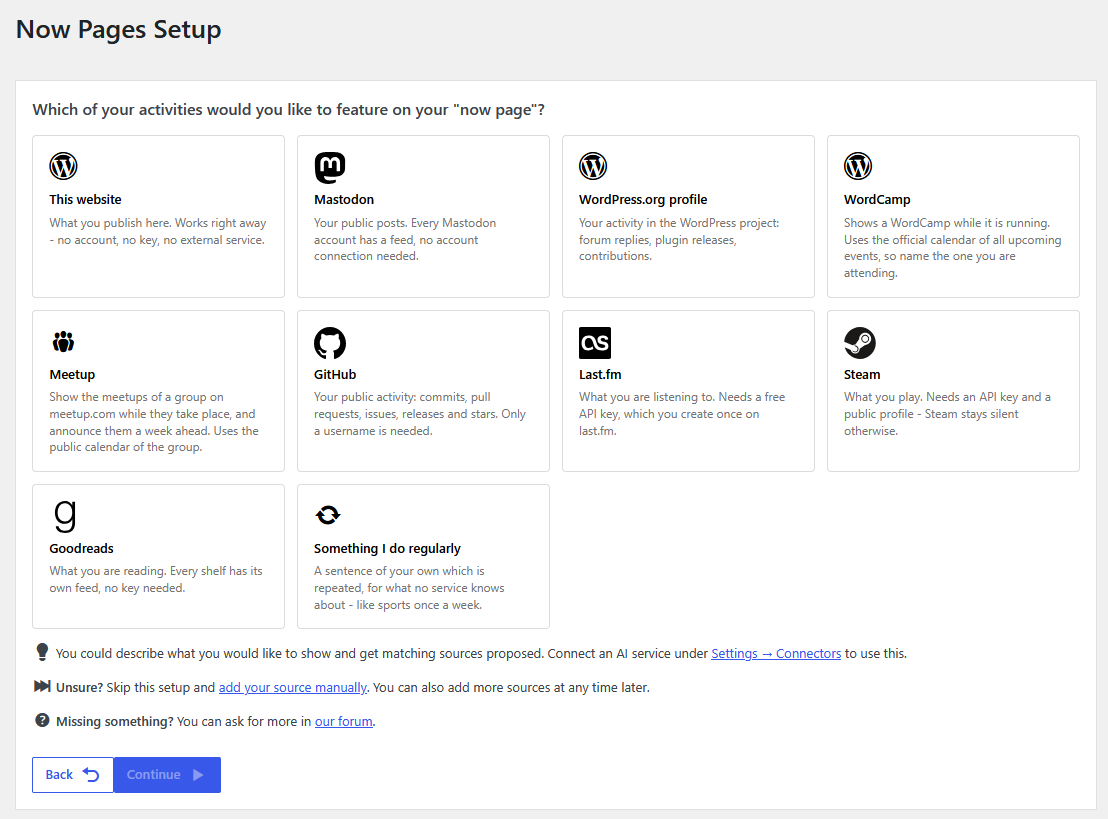
- Start the setup and pick a first source – for example your Fediverse account, your calendar or “Went to the gym” once a week.
- Done. Your Now page is live – usually at
/now– and keeps itself up to date.
Not sure, which source fits? Describe in your own words what you want to show, and AI suggests matching sources – each one tested before it is offered to you.
What your Now page can show
- Your routines – things no service knows about, like sports, hiking or dancing: write a sentence once, and it is repeated on a schedule – right away or only after you confirm it, in the list of entries or with a click in an email
- Your own entries – a concert, a trip, a new chapter in your life: add them by hand whenever you like
- Your social media – your posts in the Fediverse and any profile with an RSS feed, e.g., your Bluesky or YouTube channel
- Your calendar – events from any ICS calendar, Meetup groups and WordCamps
- Your music, games and books – what you’re listening to on Last.fm, playing on Steam or reading on Goodreads
- Your website – your newest posts, from this or any other blog
- Your work – activity on GitHub or WordPress.org
- Everything else – via webhooks from any system, e.g. a Discord bot or an automation
You stay in control
- Choose the time span your page covers – from live to six months
- Show entries as they are or let AI write a readable summary
- Group entries and organize them with categories
- Delay new entries for your privacy, so nobody knows where you are right now
- Preview your Now page before anybody else sees it
- Share it in the Fediverse via the ActivityPub plugin – daily, weekly or entry by entry – and let people reply to it
- Let your AI assistant find, test and create sources via the WordPress Abilities API
Supported page builders
Use native widgets, elements and blocks to make your Now page look its best.
Native support
- Avada
- Avia (Enfold)
- Beaver
- Bold Page Builder
- Breakdance
- Bricks
- Brizy
- Divi 4
- Divi 5
- Elementor
- Fusion Page Builder
- Gutenberg / Block Editor
- LiveComposer
- Oxygen
- Pagelayer
- SiteOrigin
- Themify
- WpBakery
- ZionBuilder
Also supported
- Classic WordPress Widget
- Colibri Page Builder using the classic WordPress widget
- GeneratePress using the block
- Kubio using the block
- Nimble Builder using the classic WordPress widget
- SeedProd Pro using the classic WordPress widget or shortcode
- Shortcode:
[threadi_now_pages_digest] - Visual Composer using the classic WordPress widget
External services
This plugin does not contact any external service on its own. It only does so if you set up a source for one of the services below. Each source is then
requested during every import run (by default hourly via WP-Cron) and when you trigger an import manually.
Like WordPress itself, every one of these requests sends the address of your website as part of its user agent (e.g. NowPages/1.0.0; https://example.com). Where the services below say that no other data is transmitted, this address is the exception.
-
GitHub – used to read the public activity of the account you enter, so
your commits and releases can be shown on your Now Page. The username you
configured is sent toapi.github.comwith every import, and the personal
access token, if you entered one. No other data from your site is
transmitted.
(Terms of Service,
Privacy Policy) -
Last.fm – used to read the tracks you have scrobbled. The username and
the API key you configured are sent tows.audioscrobbler.comwith every
import. No other data from your site is transmitted.
(Terms of Use,
Privacy Policy) -
Steam – used to read the games you recently played. The SteamID and the
API key you configured are sent toapi.steampowered.comwith every import.
No other data from your site is transmitted.
(Steam Web API Terms of Use,
Privacy Policy) -
Goodreads – used to read the books on one of your shelves via its RSS
feed. The numeric user ID and the shelf name you configured are sent to
www.goodreads.com with every import. No other data from your site is
transmitted.
(Terms of Use,
Privacy Policy) -
WordPress.org – used to read your public profile activity via its RSS
feed. The username you configured is sent toprofiles.wordpress.orgwith
every import. No other data from your site is transmitted.
(Terms of Service,
Privacy Policy) -
WordCamp Central – used to read the public calendar of upcoming
WordCamps fromcentral.wordcamp.org/calendar.ics. Only the request itself
is sent; no personal data is transmitted.
(Terms of Service,
Privacy Policy) -
Meetup – used to read the public calendar of the group you enter, so
its events can be shown on your Now Page. The name of the group you
configured is sent towww.meetup.comwith every import. No other data
from your site is transmitted.
(Terms of Service,
Privacy Policy) -
Mastodon – used to read the public posts of your account via its RSS
feed. The request goes to the instance you entered yourself, and only the
account name you configured is sent. Terms and privacy policy depend on that
instance and can be found there.
Sources of the type “Own website”, “RSS/Atom feed” and “Calendar (ICS)” request the address you enter yourself. No third-party service is involved.
-
The AI service you connected to WordPress – only used if you connected one
under Settings Connectors, and only for two optional features. If you choose
“Get advice” when adding a source, your description and the list of source
types this website offers are sent to that service; no keys, no entries and
no existing sources are sent. Each proposed source is then requested once to
check that it works, before it is offered to you. If you choose the
AI-generated format for your Now Page, the texts of the entries to summarize
are sent to that service. Which service this is, and its terms and privacy
policy, depend on the connector you chose. The advice can be switched off
under Settings Now Pages AI. -
The Fediverse – only used if you installed the plugin
ActivityPub and chose what to
share under Settings Now Pages Fediverse. Then a summary of each day or
week, or each single entry, is handed to that plugin, which delivers it to the
servers of the people following your website. Only what visitors can see on
your now page is shared, and not before the privacy delay has passed. What has
reached other servers cannot be taken back reliably: removing an entry asks
them to delete it, whether they do is up to them. Terms and privacy policy
depend on the servers of your followers. Nothing is shared by default.
If you use the availability check on a source, the plugin resolves the host of
that source’s address and opens a connection to it in order to report where a
problem occurs. This contacts the same address the source itself uses, and no
data from your site is transmitted.
Repository, documentation and reliability
The development repository is on GitHub. Developers will find several hooks there.
Each release is only published if it passes:
✅ WordPress Coding Standards
✅ PHPStan
✅ PHPUnit tests
✅ Smoke and Playwright tests
Details
Related plugins
Plugins that also contain the tag activity
Simple History – Track, Log, and Audit WordPress Changes

BuddyPress Group Email Subscription

Counter-Hits

BuddyPress Edit Activity

Wbcom Designs – Shortcodes & Elementor Widgets For BuddyPress

Track, Analyze & Optimize by WP Tao


About
Plugin for that tries to help you find the WordPress plugin you are looking for.
| Please enjoy an image of Crush (this awesome turtle) and have a lovely day! |  |
We do not own any plugin listed on this site and do not work for or work with WordPress.com or it's associated companies. We simply provide a searchable list of the available WordPress plugins.