



Tickets & Passes for WooCommerce
Tickets & Passes for WooCommerce adds three product types to your shop: Ticket, Timeslot Ticket and Pass. Customers buy them the same way they buy anything else in your store, and every purchase issues a QR code.
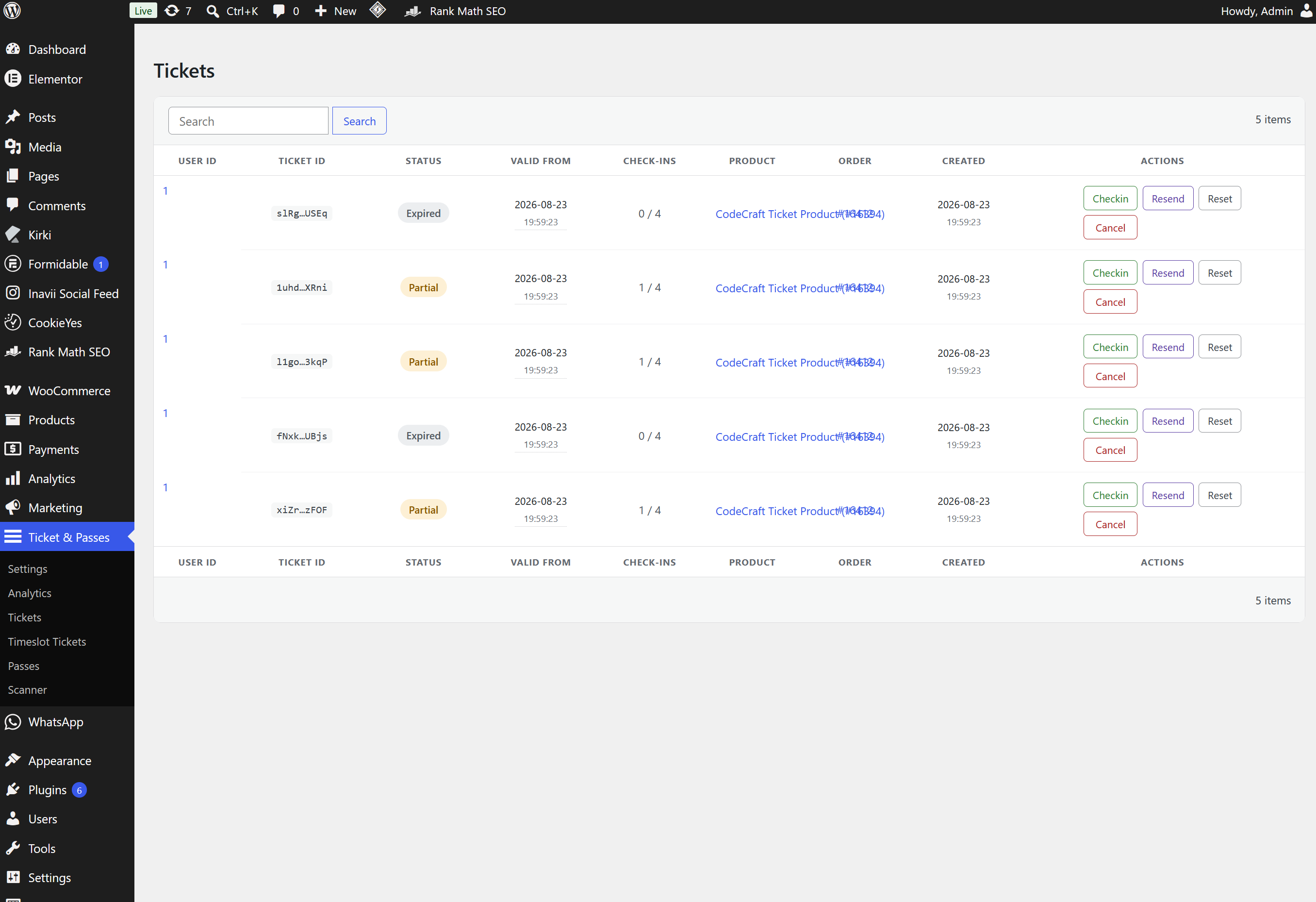
The door side is in the box. You get a phone scanner page at /check-in/, a Scanner user role for staff who should not see the rest of wp-admin, and admin dashboards where you can search a ticket, check someone in by hand, resend a QR code, reset it or cancel it. There is no external ticketing service to sign up for and no fee per ticket sold.
Built for venues, attractions, museums, escape rooms, festivals, clubs and anyone else who sells admission and then has to let people in.
The three product types
Ticket is plain admission with a validity window and a set number of uses. Day tickets, entry tickets, gift admission.
Timeslot Ticket is admission for a specific date and time. Slots can be generated on a repeating schedule, so you are not building next month by hand, and unpaid reservations are released again on their own. An abandoned checkout will not sit on a seat.
Pass is valid across a period instead of a single visit: season passes, memberships, annual cards. A pass can include guest passes that the holder gives away, and it can carry a cardholder photo that staff see when they scan it.
Checking people in
The scanner is a full screen page on its own URL. No admin bar, no theme menu, nothing for door staff to get lost in.
- Scan results are colour coded: valid, already used, expired, on cooldown, or not found. You pick the colours.
- It runs in any modern mobile browser. Where the phone has a native barcode detector it uses that, otherwise it decodes in the page. Staff install nothing.
- Pass scans show the cardholder photo, so staff can see whether the person at the door is the person on the pass.
- The Scanner role gives someone check-in access and nothing else.
- The scanner talks to a REST check-in API. If you would rather use a third party scanner app, it can call the same API.
Every check-in decision is made on your server, never on the phone.
For whoever runs the shop
Tickets, timeslot tickets and passes each get their own dashboard with search, manual check-in, resend, reset and cancel. An analytics screen charts check-in activity by day and by hour. Colours and hint text are set per product type, so a ticket looks like it belongs to your site rather than to a plugin. Everything is gated on the manage_woocommerce capability, which means a Shop Manager can run the whole thing without an Administrator account.
For your customers
Tickets and Passes tabs are added to the normal WooCommerce My Account page. From there a customer can view a QR code, download a printable PDF, upload a pass photo if you have asked for one, and hand out any guest passes their pass came with.
Emails
The WooCommerce order emails are extended with the ticket, timeslot ticket or pass details. Four more templates cover resending a ticket, resending a pass, and inviting a guest pass recipient, with separate wording depending on whether that person already has an account. Every subject and message body is edited in wp-admin and supports merge tags for order and ticket details.
Nothing to maintain
An hourly job generates the next batch of recurring timeslots. A per minute job releases timeslot reservations that were never paid for. Both run in the background.
Requirements
- WooCommerce, installed and active. WordPress will not let the plugin activate without it.
- PHP 8.1 or newer.
- HTTPS on the site, because phone browsers only give camera access to secure pages.
Configuration
Settings live under Ticket & Passes > Settings, in six tabs. Only the tabs for the product types you actually sell need configuring.
General
- Display Date Format sets how dates and times are printed across the dashboards and the customer facing pages.
- Enable Analytics Dashboard adds the check-in and sales statistics screen.
Ticket
- Enable Ticket Product adds Ticket to the WooCommerce product type dropdown.
- Accent Color is the card border and button colour used for tickets on My Account > Tickets.
Timeslot Ticket
- Enable Timeslot Ticket Product adds Timeslot Ticket to the product type dropdown.
- Date Picker Hint Text is the line above the date picker telling customers to pick a date and then a time.
- Seven colour settings (accent, text, border, background, hint, day name and month/year title) style the date and timeslot picker.
Pass
- Enable Pass Product adds Pass to the product type dropdown.
- Persons Section Hint Text is the line above the person fields, explaining what to fill in for each person the pass covers.
- Five colour settings (accent, text, border, background and hint) style the per person cards.
- Profile Photo Upload Path is where pass photos are stored, relative to
wp-content/uploads. Keep that folder out of any publicly executable location and without execute permissions.
Scanner / API
- Enable API registers the check-in REST endpoints. Every scanner, built in or third party, goes through them. Switch this off only if you do not check anyone in at all.
- Enable built-in scanner switches the
/check-in/page on. Leave it off if you use a third party scanner app instead, the API keeps working either way. The scanner URL is shown here once it is on. - Three scanner colours: one for a successful check-in, one for a code that is outside its valid window or already used, expired or on cooldown, and one for a request that matches no ticket, timeslot ticket or pass at all.
Five templates, each with an editable subject where one applies and a message body in the normal WordPress editor. Merge tags are available for order and ticket details.
- WooCommerce Order Confirmation and WooCommerce Completed Order add your own text to the WooCommerce order emails when the order contains a ticket, timeslot ticket or pass.
- Resend Ticket and Resend Pass go out when you or the customer resends a QR code from the order screen or the account page.
- Guest Pass Invite – New User and Guest Pass Invite – Existing User go to a guest pass recipient, worded for whether they already have an account.
Source Code and Third-Party Libraries
This plugin ships no compiled or obfuscated code. Every PHP, JavaScript and CSS file
written for this plugin is included in readable, editable form, and no build step
(npm, webpack, Composer, etc.) is required to run or modify it.
The following third-party libraries are bundled unmodified. Each is the upstream
distribution file, at the version listed:
- dompdf 3.1.6 – PDF rendering – https://github.com/dompdf/dompdf – LGPL-2.1
(bundled in inc/functions/lib/dompdf/, installed with Composer, together with its
dependencies dompdf/php-font-lib 1.0.2, dompdf/php-svg-lib 1.0.2, masterminds/html5
2.10.1, sabberworm/php-css-parser 9.4.0 and thecodingmachine/safe 3.4.0) - endroid/qr-code 5.1.0 – QR code generation – https://github.com/endroid/qr-code – MIT
(bundled in inc/functions/lib/qrcodegen/, installed with Composer, together with its
dependencies bacon/bacon-qr-code 3.0.1 and dasprid/enum 1.0.6) - jsQR 1.4.0 – QR decoding in the check-in scanner – https://github.com/cozmo/jsQR – Apache-2.0
(inc/scanner/js/jsqr.js) - ApexCharts 6.9.0 – charts on the analytics screen – https://github.com/apexcharts/apexcharts.js – MIT
(inc/analytics-dashboard/lib/apexcharts.min.js) - Air Datepicker 3.6.0 – date picker for timeslots – https://github.com/t1m0n/air-datepicker – MIT
(lib/air-datepicker/)
The two Composer-installed libraries can be regenerated from their composer.json with
composer install; the three JavaScript libraries are the unmodified dist files
published by their projects on npm, and their readable sources live in the linked
repositories.
Details




Related plugins
Plugins that also contain the tag booking
LatePoint – Calendar Booking Plugin for Appointments and Events

Booking for Appointments and Events Calendar – Amelia

Online Scheduling and Appointment Booking System – Bookly

Appointment Booking Calendar — Simply Schedule Appointments Booking Plugin

Fluent Booking – The Ultimate Appointments Scheduling, Events Booking, Events Calendar Solution

SimplyBook.me – Booking and reservations calendar


About
Plugin for that tries to help you find the WordPress plugin you are looking for.
| Please enjoy an image of Crush (this awesome turtle) and have a lovely day! |  |
We do not own any plugin listed on this site and do not work for or work with WordPress.com or it's associated companies. We simply provide a searchable list of the available WordPress plugins.