


TP Show Product Images on Checkout Page for WooCommerce
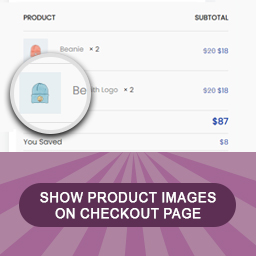
If you are familiar with WooCommerce, then you know that The Order Review section of the WooCommerce Checkout Page shows the product name, quantity and subtotal,
But no product image, which can be very useful to identify/differentiate between similar products or product variations.
TP Show Product Images on Checkout does just that, the product featured image next to the product name inside the order review table. Easy and powerful!
But Wait, There’s More!
In addition you can:
1. Show total discount on Cart/Checkout page.
2. Show Regular/Sale price on Cart/Checkout page.
3. Show total amount of money a customer saved (sale prices plus coupon discounts).
And we forgot to mention, all for free!
So what are you waiting for? Download the plugin and enjoy.
Plugin Features
- Show product images on Checkout page.
- Show total discount on Cart/Checkout page.
- Show Regular/Sale price on Cart/Checkout page.
- Show total amount of money a customer saved (sale prices plus coupon discounts).
- Responsive Layout.
- Customize image border radius.
- 100% mobile friendly.
- Supported WPML multilanguage plugin.
- All plugins labels are fully customizable.
- RTL support.
- Works with variations types.
- Easy and nice uninstall – clear all plugins data if plugin delete.
- Working with Most of Premium themes.
? You May Also Like
Details


Related plugins
Plugins that also contain the tag checkout
Brazilian Market on WooCommerce
reCAPTCHA for WooCommerce

Fluid Checkout for WooCommerce – Lite

Amazon Pay for WooCommerce

PayTR Sanal POS WooCommerce – iFrame API

Kustom Checkout for WooCommerce


About
Plugin for that tries to help you find the WordPress plugin you are looking for.
| Please enjoy an image of Crush (this awesome turtle) and have a lovely day! |  |
We do not own any plugin listed on this site and do not work for or work with WordPress.com or it's associated companies. We simply provide a searchable list of the available WordPress plugins.