


Utmatra – UTM Attribution and Tracking
Utmatra gives you self-hosted, privacy-respecting campaign tracking for any UTM-tagged link on or off your WordPress site — no third-party analytics service required.
Tracking engine:
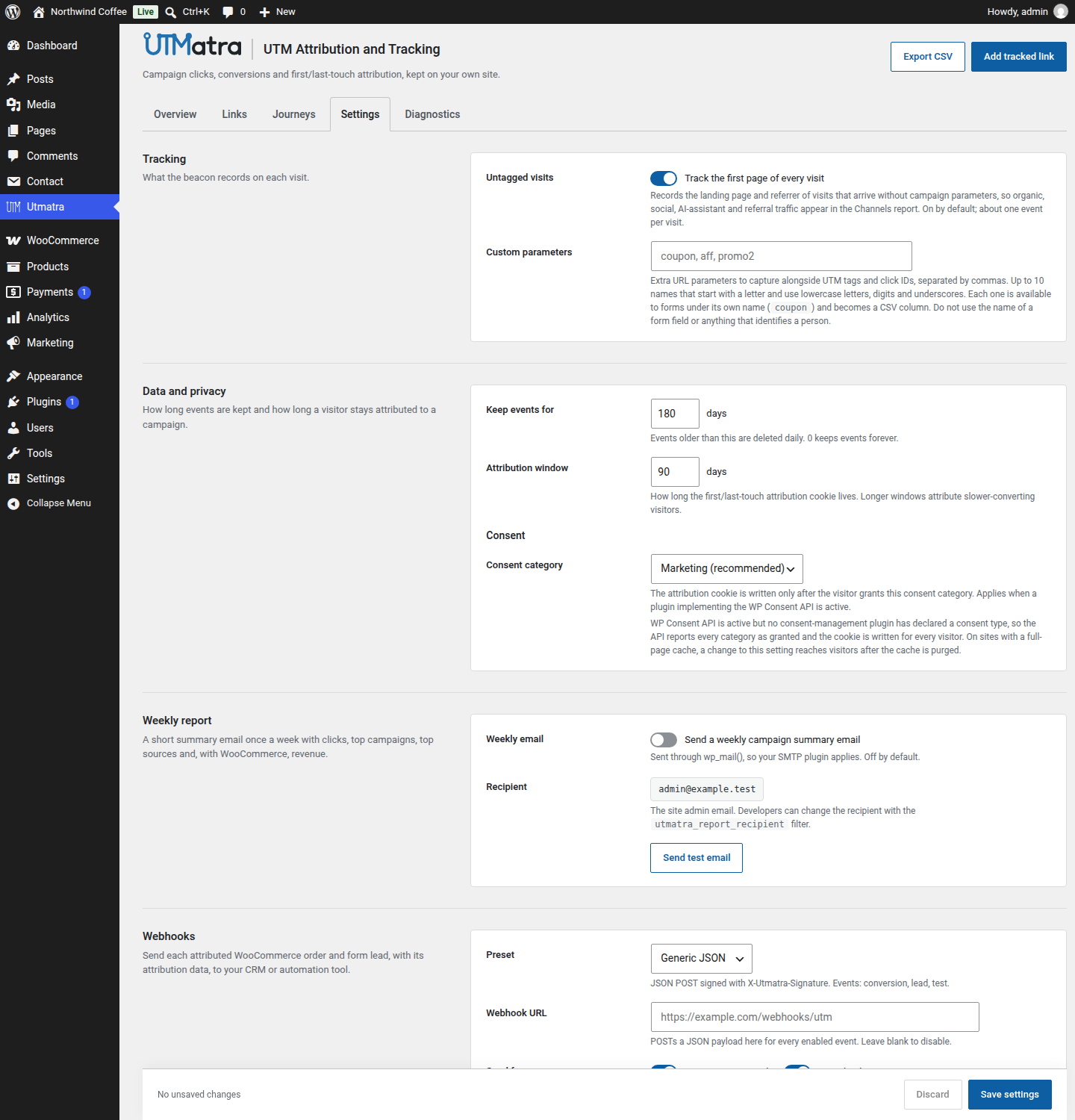
- Cache-proof tracking beacon — a tiny front-end beacon records the first page of every visit (with its referrer) and every UTM-tagged visit, even when your pages are served from a full-page cache, where PHP never runs. Later untagged page views in the same visit send nothing. “Track the first page of every visit” in Settings switches visit recording off.
- Channel classification — every recorded visit is filed into a marketing channel at write time: direct, organic search, paid search, paid social, organic social, email, referral, AI assistant (ChatGPT, Perplexity, Claude, Gemini, Copilot and others), display and affiliate.
- Passive UTM tracking (no-JS fallback) — on uncached pages, any request arriving with a
utm_*parameter or an ad click ID (gclid,fbclid,msclkid,ttclid,li_fat_id,twclid) is also recorded server-side. - Custom parameters — name up to ten extra URL parameters of your own (a coupon code, an affiliate ID, a promo code) under Settings Tracking, and from then on they are captured exactly like the built-in UTM and click-ID parameters: recorded on the event, carried in the attribution cookie, order data and webhook payloads, offered to forms under their own names, exported as CSV columns, and settable per tracked link (see the custom parameters FAQ).
- Bot filtering — crawlers, link-preview unfurlers, and monitoring agents are recognised by user agent and never pollute your stats. Bots still receive the redirect, so social link previews keep working.
- Click deduplication — repeat hits from the same visitor with identical parameters within a 30-minute window (filterable) are recorded once.
- First/last-touch attribution cookie — campaign parameters or, for visits from a search engine, social network, AI assistant or other site, the channel and referrer host are persisted in a first-party cookie (
utmatra_attr, 90 days) with separate first-touch and last-touch sets. Direct visits never write it.
Links & sharing:
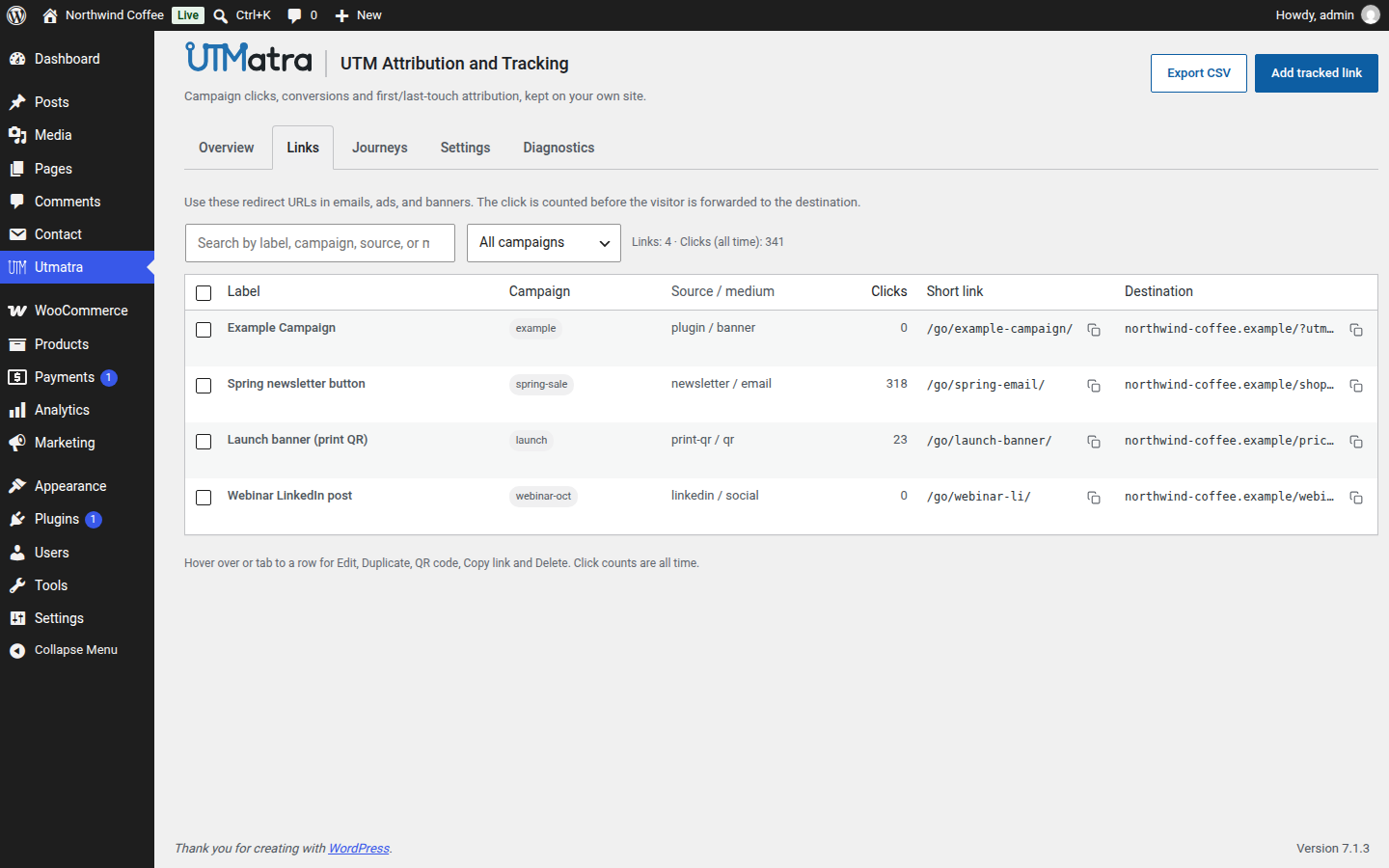
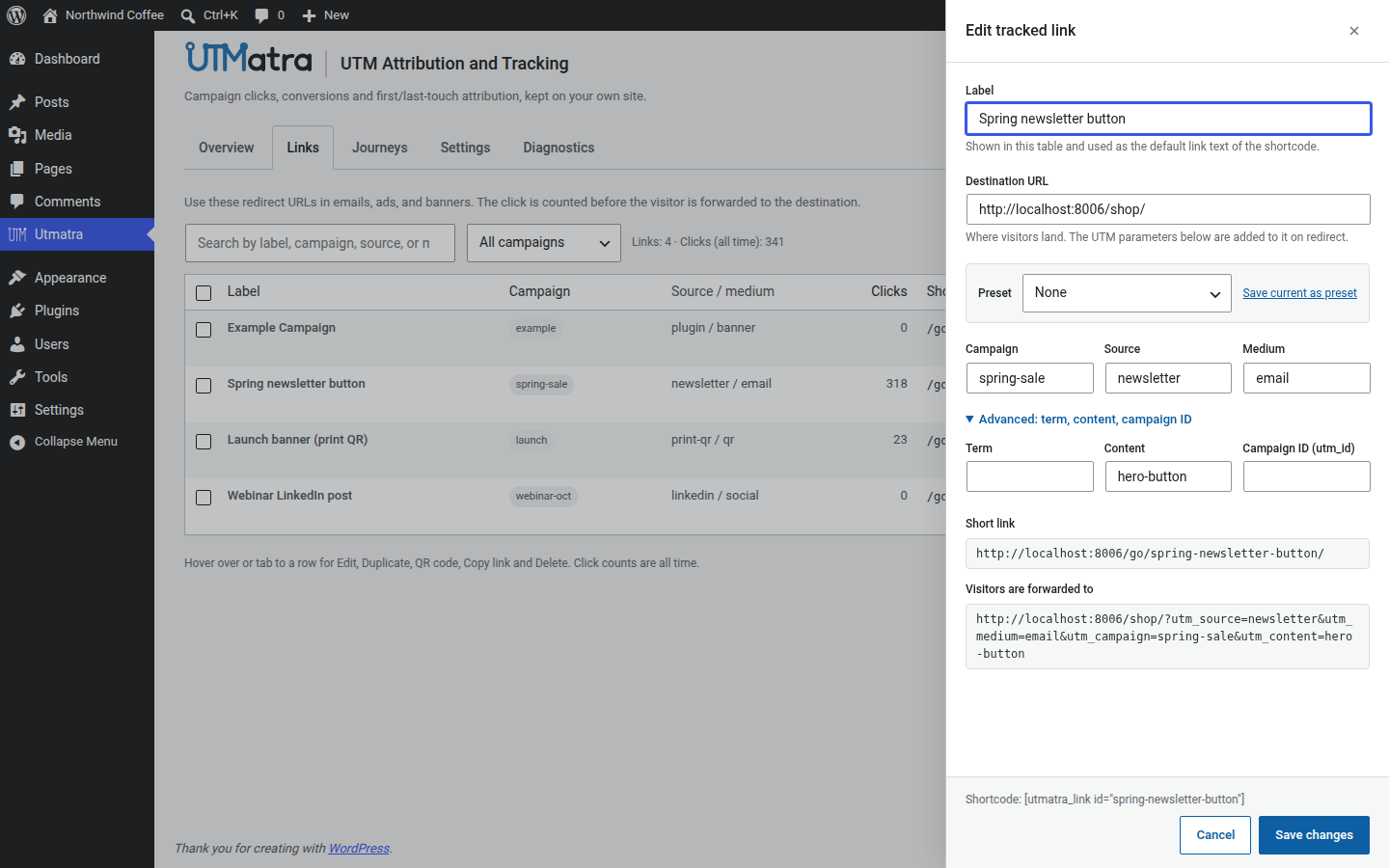
- Pretty short links — every managed link gets a clean
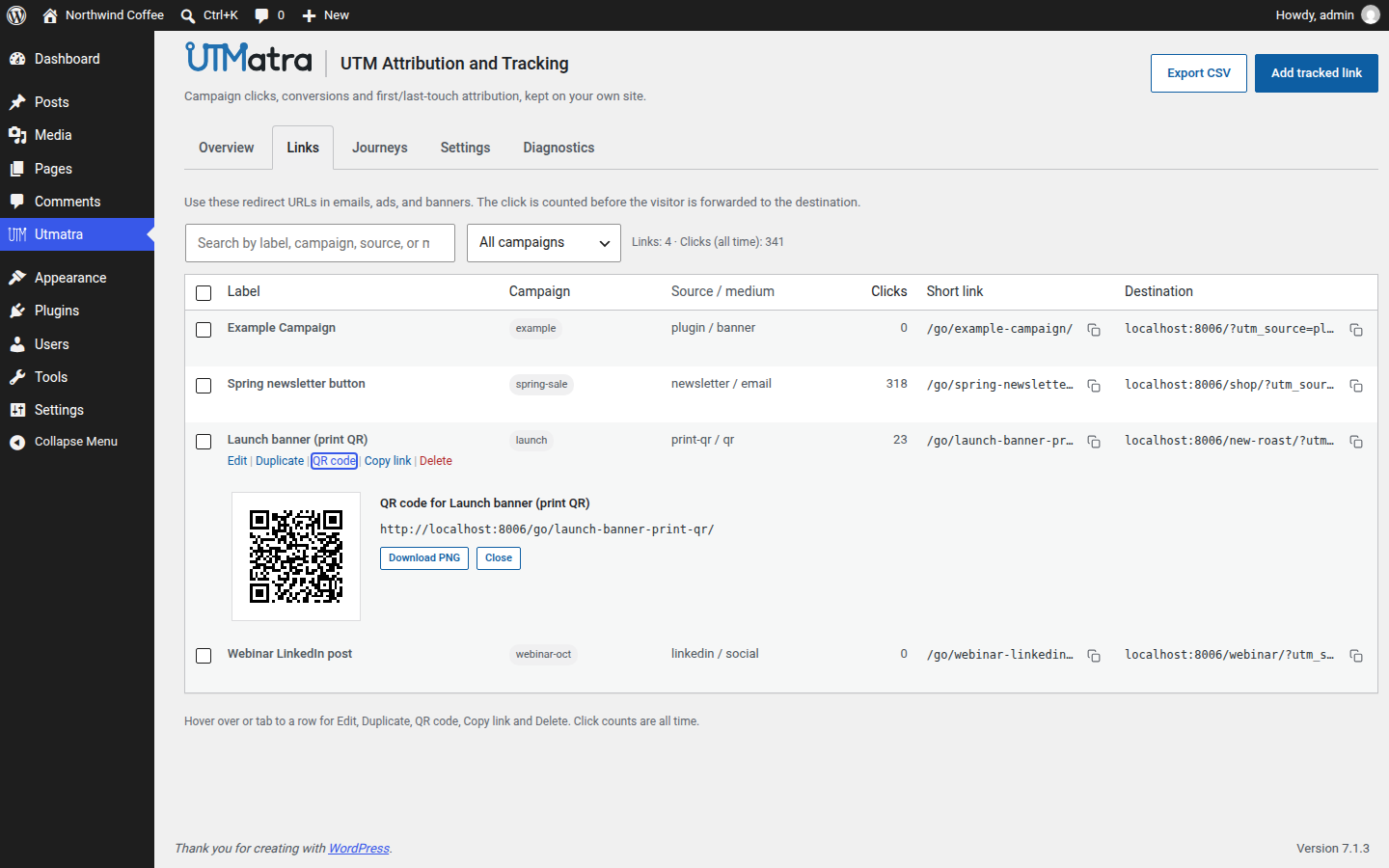
/go/{slug}/URL (query-string form on plain permalinks). The click is counted before the visitor is forwarded to the destination with full UTM parameters appended. - QR code per link — generate a scannable QR code for any tracked link straight from the dashboard and download it as a PNG. Generated entirely in your browser — no external service is contacted.
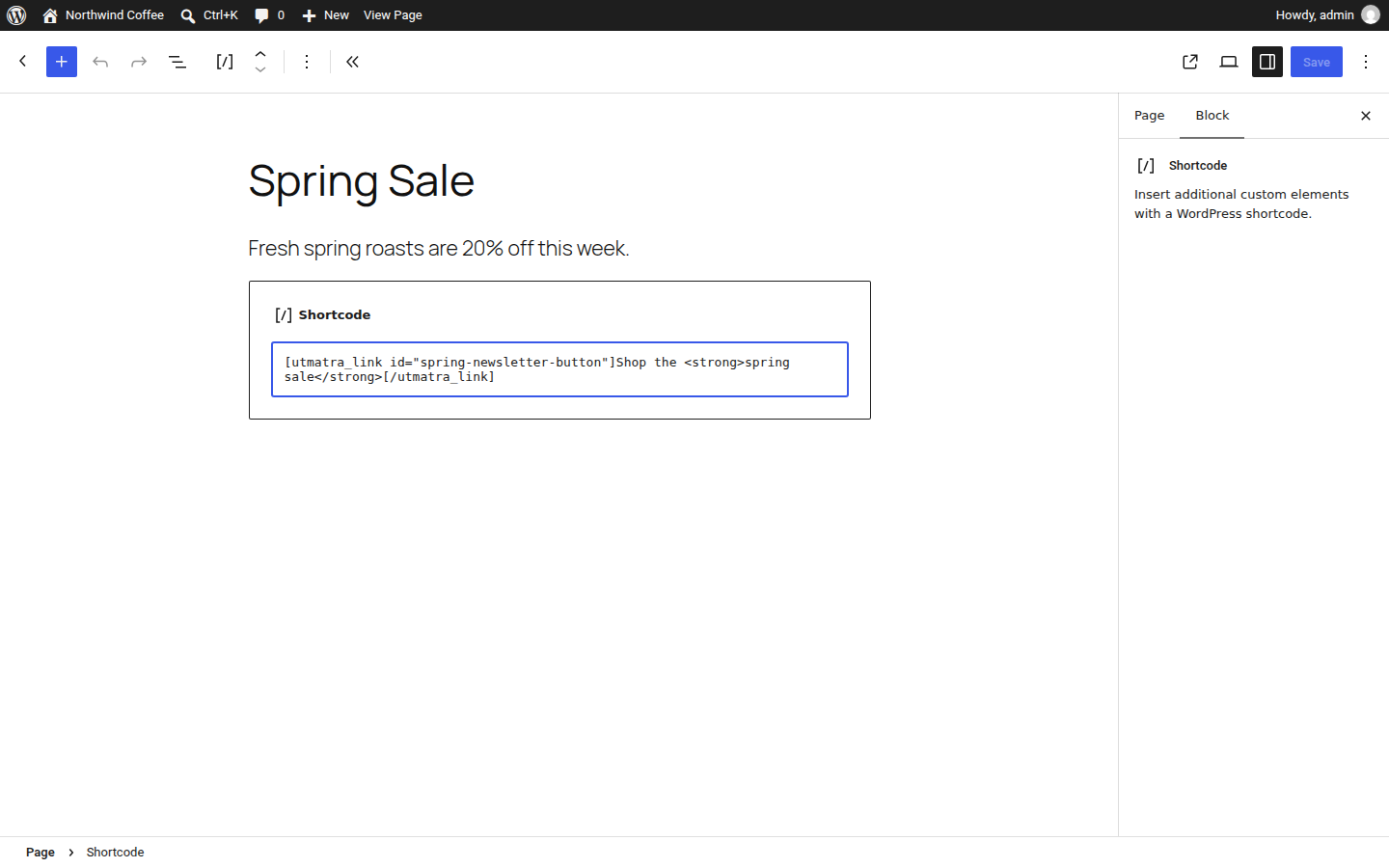
- [utmatra_link] shortcode — embed tracked links in posts, pages, or widgets; supports enclosing content:
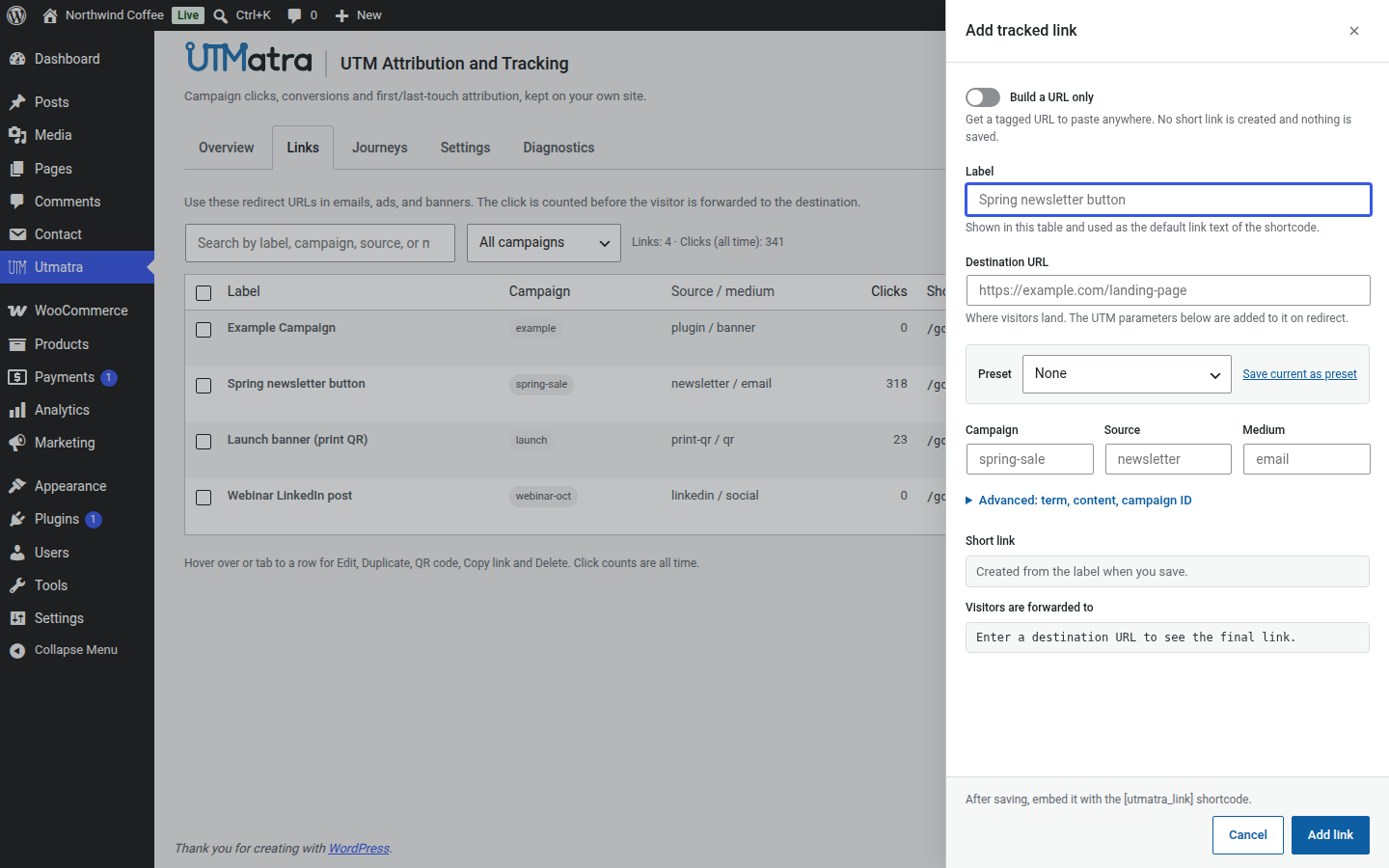
[utmatra_link id="sale"]Shop the <strong>sale</strong>[/utmatra_link]. - UTM naming conventions — the add-link form lowercases values and replaces spaces with
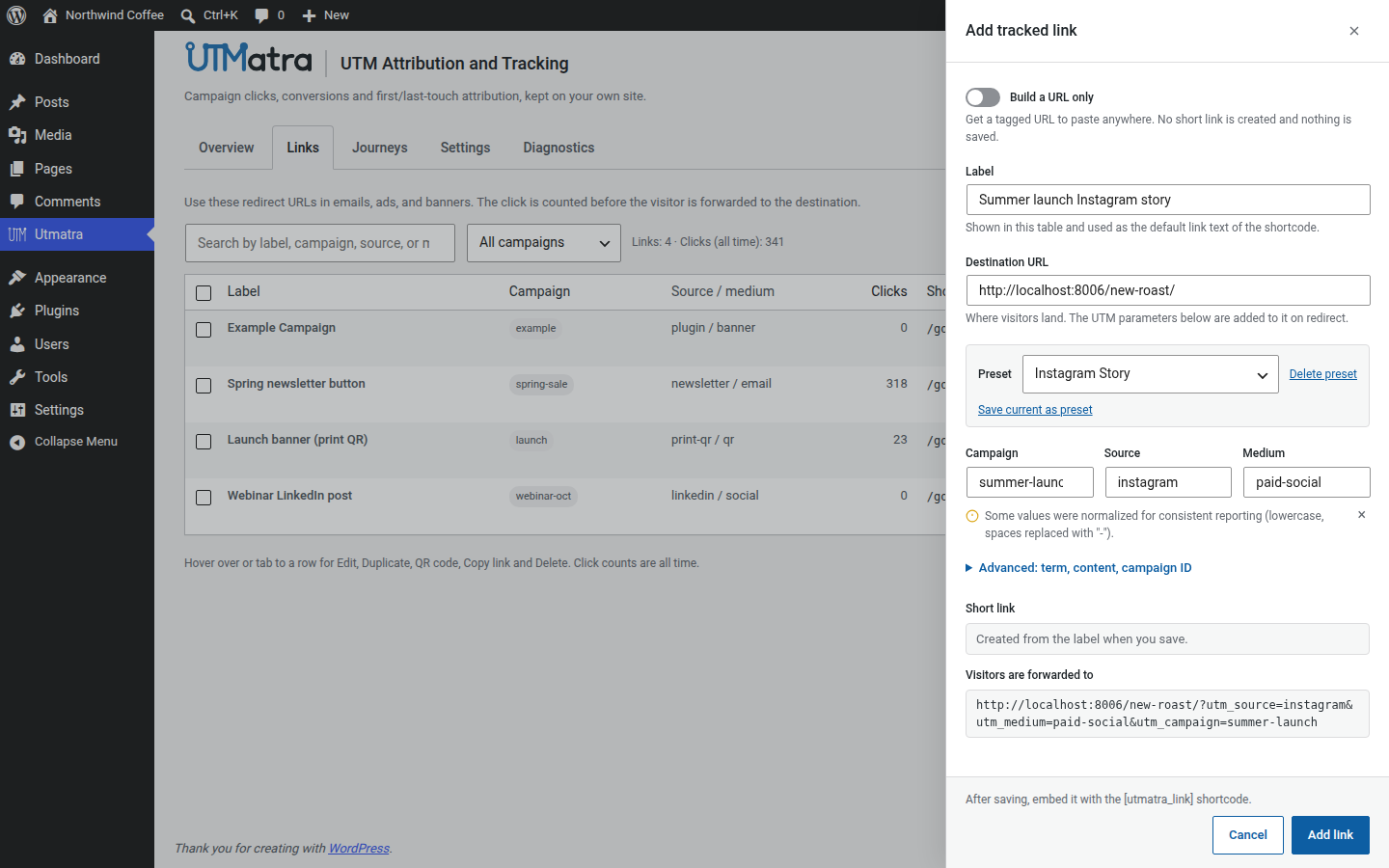
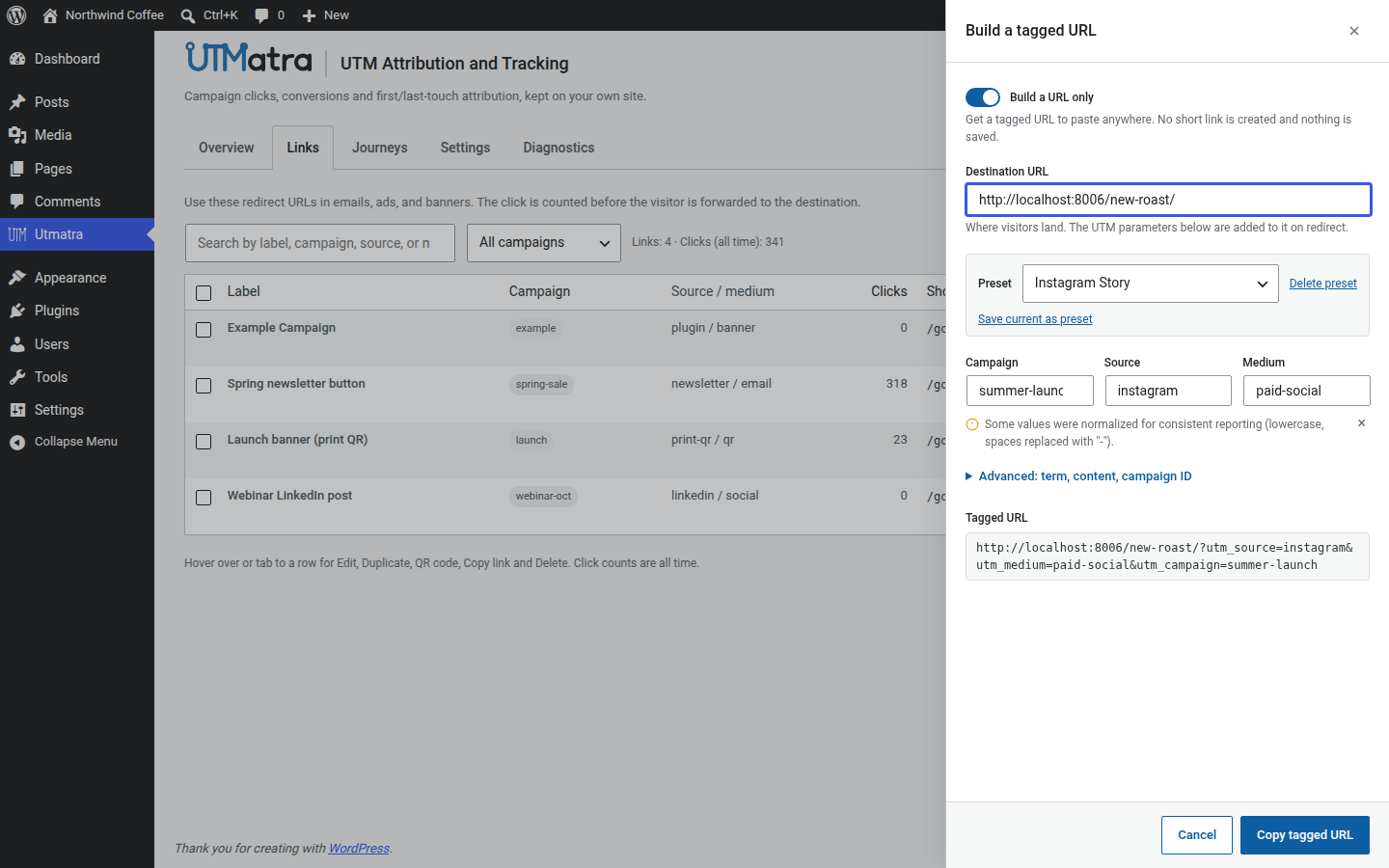
-(with a heads-up notice), and suggests previously used sources, mediums, and campaigns — soMy Newsletterandmy-newsletternever fragment your reports into separate rows. Save a source/medium/term/content combination as a named preset (e.g. “Instagram Story”) to apply it to future links in one click.
Reporting:
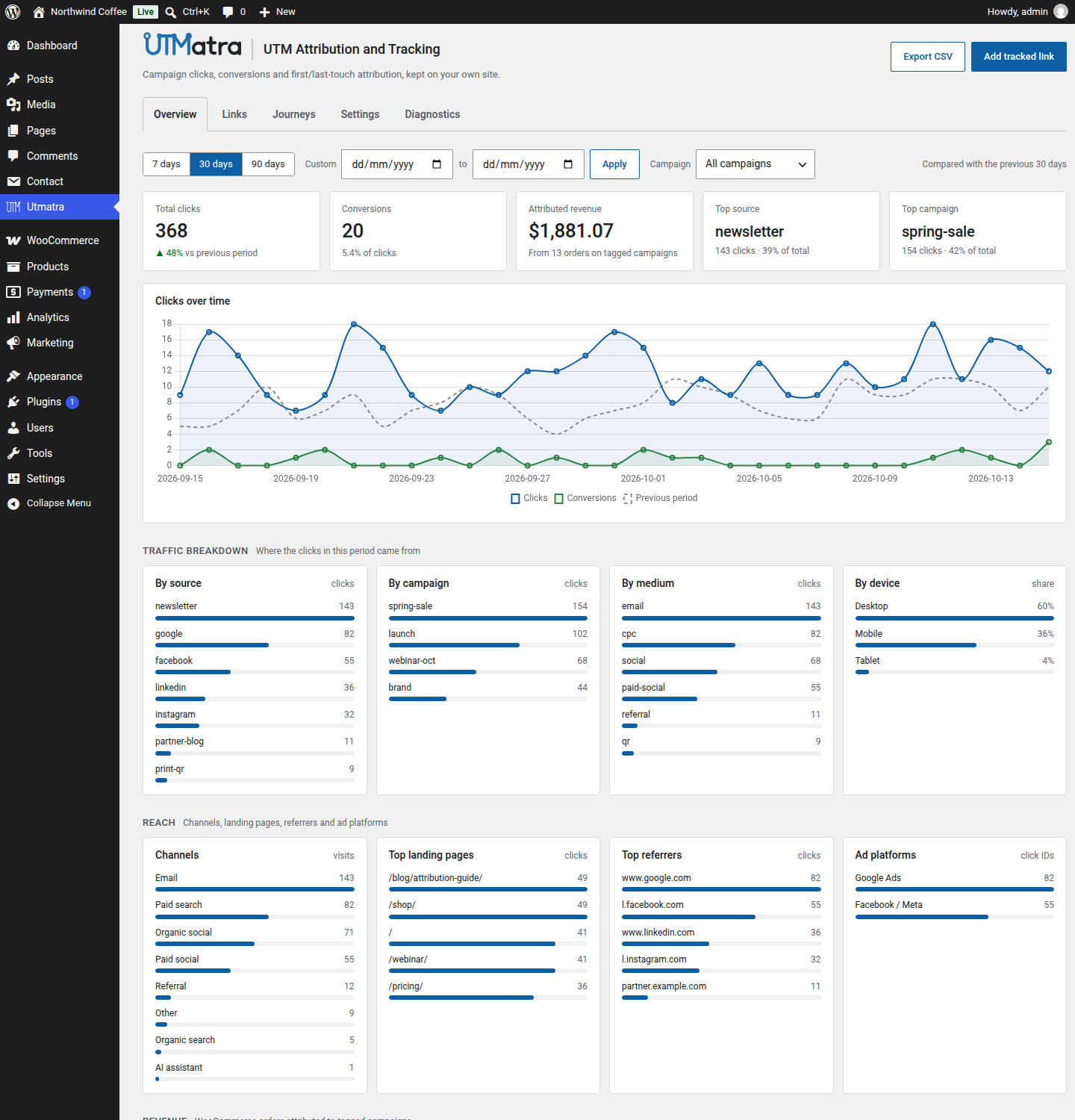
- Chart.js dashboard — clicks over time, breakdowns by source, campaign, medium, device type, channel (direct, organic search, paid search, paid social, organic social, email, referral, AI assistant, display, affiliate), top landing pages, top referrers, and ad platform, filterable by date range (7/30/90 days) and campaign. The Conversions tile counts WooCommerce orders and attributed form leads.
- WooCommerce revenue attribution — orders are stamped with the buyer’s first- and last-touch campaign data at checkout (visible in a metabox on the order screen), the conversion is recorded once the order is paid, and a revenue-by-campaign chart shows what your campaigns actually earn. Revenue counts orders only; form leads are conversions without a total.
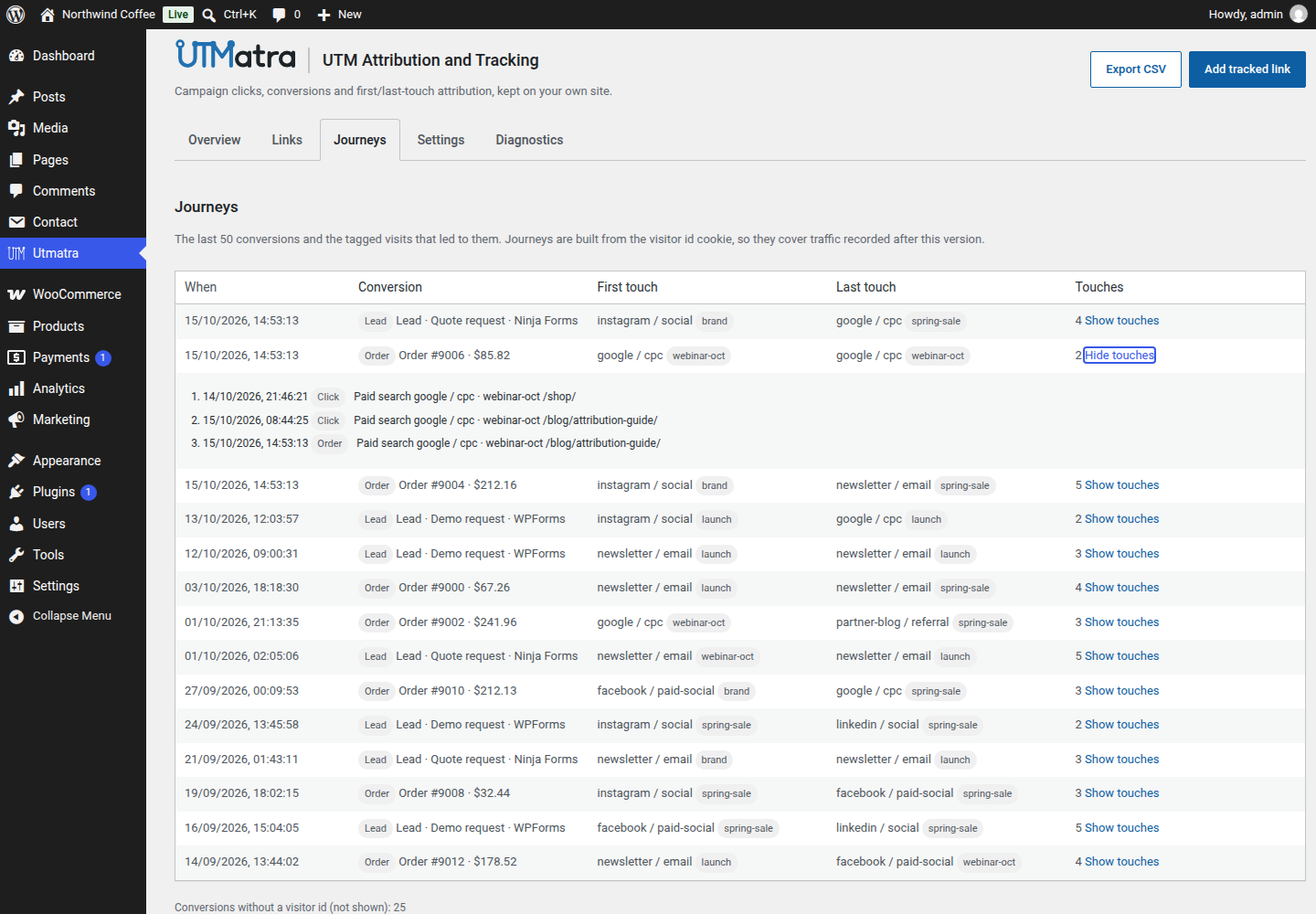
- Customer journeys — a Journeys tab lists recent orders and form leads with every tagged visit that preceded them, built from a random first-party visitor id.
- Lead webhooks — every attributed form submission is recorded as a conversion and can be POSTed, with its attribution data and submitted field values, to Zapier, Make, HubSpot or GoHighLevel (see the webhook FAQ).
- CSV export — download the raw events for any period as a CSV (the newest 10,000 rows), each row with its channel. Conversion rows are included alongside clicks, so the export can hold more rows than the dashboard click total. Exports never include IP hashes or user agents, and cell values are guarded against spreadsheet formula injection.
- Read-only REST API — every dashboard dataset (stats, links, events, journeys, export, diagnostics) is available over
utmatra/v1to administrators using WordPress Application Passwords (see the REST API section). - Weekly email summary — an optional (off by default) weekly email with total clicks, top campaigns, top sources, and revenue when WooCommerce is active.
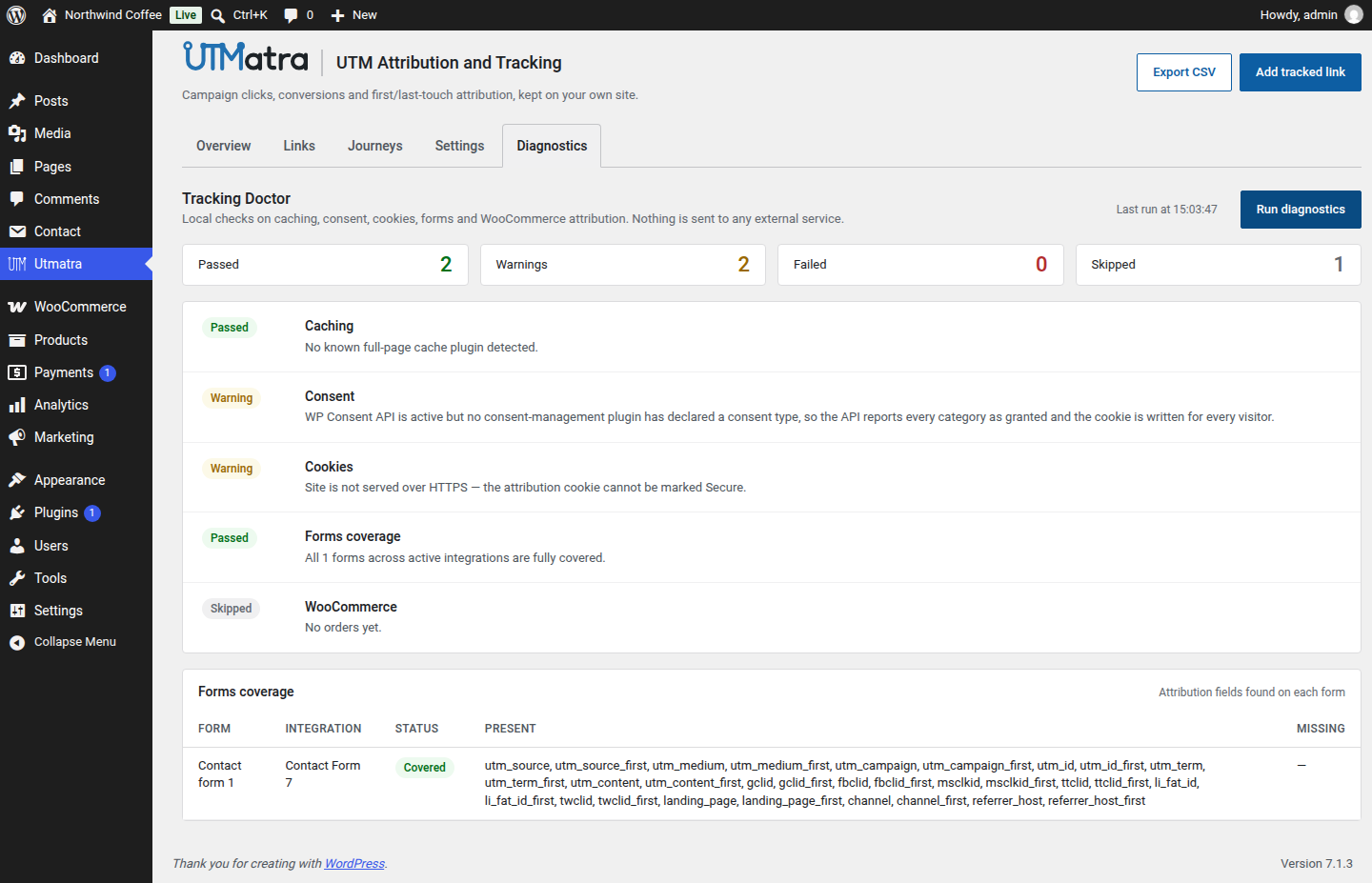
- Tracking Doctor diagnostics — a “Run diagnostics” panel on the settings card runs five rule-based local checks (caching, consent, cookies, per-form attribution coverage, WooCommerce order attribution) and reports pass/warn/fail/skip with a plain-language explanation for each. No AI, no external calls — every check inspects local plugin/site state only.
Forms & integrations:
- Form attribution capture — add a hidden field named
utm_source(or any other tracked parameter) to any form and it is auto-filled from the attribution cookie. Zero-config adapters for Contact Form 7, Gravity Forms, Ninja Forms, Elementor Pro Forms, WPForms, Fluent Forms, Formidable Forms, Forminator and Bricks forms.
Privacy & housekeeping:
- Privacy-safe by design — IP addresses are stored only as salted SHA-256 hashes; the salt is unique per site.
- WP Consent API integration — the attribution cookie is gated in the visitor’s browser on a configurable consent category, deleted on withdrawal, and declared to the API so consent banners can list it.
- Data retention — events are pruned automatically after a configurable retention window (180 days by default, 0 = keep forever) from the dashboard settings card.
- Suggested privacy policy text — provided under Settings Privacy Policy Guide.
- No external services by default — no CDN calls and no third-party analytics. Chart.js, the QR library and Action Scheduler ship bundled with the plugin. The only outbound requests are the optional conversion webhooks, which stay off until you enter a receiver URL (see External services).
- Reliable background jobs — retention pruning and the weekly report run on Action Scheduler (the job queue WooCommerce uses), listed under Tools Scheduled Actions in the
utmatragroup, and they reschedule themselves if they go missing (after a reactivation, or on a multisite subsite). Action Scheduler keeps its ownactionscheduler_*tables and a once-a-minute WP-Cron queue runner; they are shared with any other plugin that uses it (such as WooCommerce) and are left in place on uninstall.
External services
The plugin contacts no external service on its own. Tracking, reports, QR codes and charts all run on your site. The one exception is the optional conversion webhook, which is off until an administrator saves a receiver URL under Settings Webhooks. Once a URL is saved, the site sends a JSON POST request to that URL, and only to that URL:
- When a tracked form is submitted (lead event): the site URL, the form plugin, form id and title, the submitted field values (these can include a name, email address and phone number; file uploads, passwords and hidden fields are never sent), the visitor’s first- and last-touch campaign data (UTM parameters, ad click IDs, custom parameters, channel, referrer host and landing page), the random visitor id, the page URL and a timestamp.
- When an attributed WooCommerce order is paid (order event): the site URL, the order id, total and currency, the first- and last-touch campaign data and a timestamp. No customer details are sent.
- When an administrator clicks “Send test webhook”: a synthetic sample payload.
Order and lead events can each be switched off. The presets only change the format of the request body; a service is contacted only if you paste one of its URLs. When you use one of these services, its terms and privacy policy apply to the data it receives:
- Zapier (Catch Hook URL,
hooks.zapier.com): Terms of service, Privacy policy. - Make (custom webhook URL,
hook.*.make.com): Terms and conditions, Privacy notice. - HubSpot (Forms API v3,
api.hsforms.com): leads only, mapped onto your HubSpot form fields. When the visitor has HubSpot’s ownhubspotutkcookie, its value is included so HubSpot can link the submission to that visitor. Terms of service, Privacy policy. - GoHighLevel (Inbound Webhook trigger,
services.leadconnectorhq.com): Terms of service, Privacy policy.
Source code and third-party libraries
The full, human-readable source of this plugin, including the bundled libraries, is public on GitHub: github.com/mahlamusa/utmatra-utm-attribution-and-tracking.
Bundled libraries (the two JavaScript files ship minified as published by their authors; their unminified source is linked below):
- Chart.js 4.5.1 (
assets/js/vendor/chart.umd.min.js), MIT license. Source: github.com/chartjs/Chart.js. - QR Code Generator by Kazuhiko Arase (
assets/js/vendor/qrcode.min.js), MIT license. Source: github.com/kazuhikoarase/qrcode-generator. - Action Scheduler (
vendor/woocommerce/action-scheduler), GPL-3.0, installed with Composer fromcomposer.json. Source: github.com/woocommerce/action-scheduler.
Filter and action reference
All filters shipped by the plugin:
utmatra_track_logged_in_users(bool, defaultfalse) — returntrueto record clicks from logged-in administrators (excluded by default to keep test traffic out of your stats).
add_filter( ‘utmatra_track_logged_in_users’, ‘__return_true’ );utmatra_is_bot(bool, receives the user agent string) — override the bot verdict for a user agent. Bots are redirected but never recorded.utmatra_client_ip(string) — the client IP used for hashing, deduplication, and rate limiting. Defaults toREMOTE_ADDR; see the reverse proxy FAQ above.utmatra_dedup_window(int, seconds, default 1800) — the window within which an identical click from the same visitor is recorded once. Return0to disable deduplication.utmatra_rate_limit(int, requests/minute/IP, default 15) — the collect endpoint’s rate limit. Raise it when many visitors share one IP (see the reverse proxy FAQ above).utmatra_retention_days(int, days, default from the settings card / 180) — the event retention window.0keeps events forever.utmatra_cookie_days(int, days, default 90) — the lifetime of both attribution cookies (utmatra_attr,utmatra_vid). Defaults to the Attribution window setting on the dashboard; the filter overrides it.utmatra_enable_cookie(bool, receivestrue) — site-wide master switch for both attribution cookies (utmatra_attr,utmatra_vid); returnfalseto never set them. Per-visitor consent is handled separately through the WP Consent API (see the consent FAQ).utmatra_consent_gate_events(bool, defaultfalse) — returntrueto also withhold event recording for tagged visits and untagged landing visits (the collect request and the PHP fallback) until the visitor grants the configured consent category.utmatra_report_recipient(string, default the admin email) — the recipient address of the weekly summary email.utmatra_channel(string, receives the computed channel slug and the event row) — override the channel a visit, click or conversion is filed under; return one ofdirect,organic_search,paid_search,paid_social,organic_social,email,referral,ai_assistant,display,affiliate,paid_otherorother(anything else keeps the computed value).utmatra_search_engine_hosts(string[]) — the referrer hosts classified as search engines. An entry with a dot matches the host and its subdomains; an entry without a dot (google) matches any label of the host.utmatra_social_network_hosts(string[]) — the referrer hosts classified as social networks, same matching rule.utmatra_ai_assistant_hosts(string[]) — the referrer hosts classified as AI assistants, same matching rule; checked before the search-engine list.
Actions:
utmatra_lead_recorded(receives the integration slug and the lead record) — fires after an attributed form submission has been recorded as a lead conversion. The record holdsform_id,form_title,posted(the attribution data),created_at,page_urlandfields(the cleaned submitted values, which the plugin itself never stores). The lead webhook listens on this action.
REST API
Every dataset the dashboard shows is available read-only over the utmatra/v1 REST namespace. All routes are GET, require an administrator (manage_options), and work with Application Passwords: create one under Users Profile Application Passwords (needs HTTPS, or WP_ENVIRONMENT_TYPE=local on a development site), then authenticate with it as the user:
curl -u "admin:xxxx xxxx xxxx xxxx xxxx xxxx" "https://example.com/wp-json/utmatra/v1/events?period=30&kind=order&per_page=100"
Logged-in administrators can also call the routes from the dashboard (cookie plus nonce authentication) — that is how the plugin’s own JS loads its data.
Conventions. All timestamps are UTC YYYY-MM-DD HH:MM:SS. The custom and meta columns are always JSON objects ({} when empty). ip_hash and user_agent are never returned by any route. Invalid arguments return HTTP 400 with WordPress’s standard envelope, e.g. { "code": "rest_invalid_param", "message": "Invalid parameter(s): kind", "data": { "status": 400, "params": { "kind": "…" } } }. Unauthenticated requests get 401; authenticated non-administrators get 403. visit rows appear only while “Track the first page of every visit” is on; channel values and custom parameter keys appear on rows recorded since those features were configured.
GET /stats — args period (days, default 30), campaign, since/until (Y-m-d, a custom range overriding period). Response: clicks_by_day[] (date, count, conversions), by_source[], by_campaign[], by_medium[], by_device[], by_channel[], by_landing[], by_platform[], by_referrer[] (each label + count), revenue_by_campaign[] (label, orders, revenue), total, previous_total, previous_clicks_by_day[], conversions, all_time_total, campaigns[].
GET /links — response links[] (id, label, destination, destination_raw, redirect_url, clicks, utm_campaign, utm_source, utm_medium, utm_id, utm_term, utm_content, custom object), suggestions (sources, mediums, campaigns), presets[].
GET /export — args period, campaign, since, until, include_visits (bool, default false). Response rows[] with the CSV column set listed in the export FAQ (plus one key per configured custom parameter), capped at the newest 10,000 rows.
GET /diagnostics — response checks[]: id, label, status (one of pass/warn/fail/skip), message, details.
GET /events — args page (default 1), per_page (default 50, capped at 200), period, campaign, since, until, channel (matches the stored channel slug only), kind (one of click, visit, order, lead), visitor_id (UUID format; any version — a non-v4 value simply matches no rows). Response events[] (newest first), total, page, per_page, total_pages. Each event carries id, link_id, visitor_id, clicked_at, utm_source, utm_medium, utm_campaign, utm_id, utm_term, utm_content, gclid, fbclid, msclkid, ttclid, li_fat_id, twclid, destination, referrer, is_conversion (bool), touch, order_total (number or null), device, channel, custom (object), meta (object) and the derived kind (click, visit, order or lead — link_id lead is a form submission, order or any legacy conversion row is an order, visit is an untagged landing, everything else is a click).
GET /journeys — args page (default 1), per_page (default 50, capped at 100), period, since, until. Response journeys[] (newest conversion first), total, page, per_page, total_pages, without_visitor (conversions in range with no visitor id). Each journey: conversion (an event object), visitor_id, first_touch and last_touch (event objects or null), touch_count (clicks and visits only), touches[] (the most recent 100 preceding events, ascending, earlier conversions included as steps) and touches_truncated.
GET /journeys/{visitor_id} — the path parameter is a UUID v4 (anything else misses the route and 404s at the router). Response visitor_id, events[] (ascending, at most 500), conversions, first_seen, last_seen, truncated. An unknown visitor id returns HTTP 404 with code: utmatra_not_found.
Details
Related plugins
Plugins that also contain the tag analytics
Site Kit by Google – Analytics, Search Console, AdSense, Speed

MonsterInsights – Google Analytics Dashboard for WordPress (Website Stats Made Easy)

WP Statistics – Simple, privacy-friendly Google Analytics alternative

GA Google Analytics – Connect Google Analytics to WordPress

Head, Footer and Post Injections

ExactMetrics – Google Analytics Dashboard for WordPress (Website Stats Plugin)


About
Plugin for that tries to help you find the WordPress plugin you are looking for.
| Please enjoy an image of Crush (this awesome turtle) and have a lovely day! |  |
We do not own any plugin listed on this site and do not work for or work with WordPress.com or it's associated companies. We simply provide a searchable list of the available WordPress plugins.