


Variation Stock Inventory
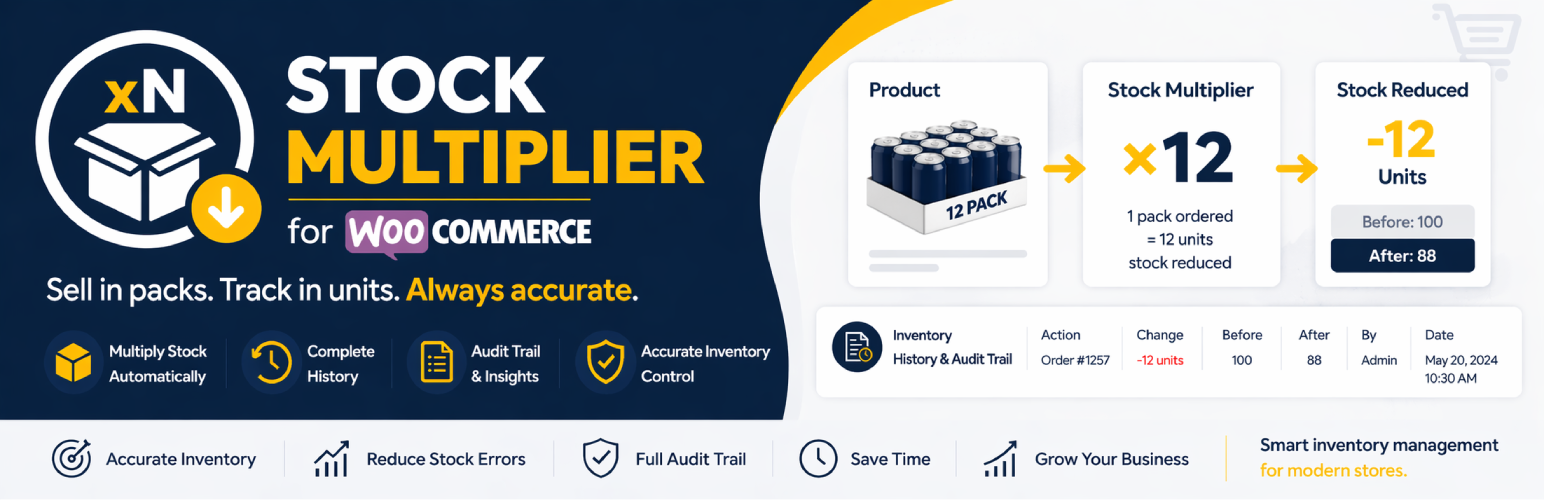
Variation Stock Inventory is a lightweight WooCommerce extension that gives you precise control over how stock is reduced when products are purchased, plus complete visibility into every inventory change. Define custom stock reduction multipliers for both simple products and individual product variations to accurately manage inventory for bundles, packs, wholesale items, or any scenario where one sale should reduce stock by more than one unit.
Perfect for store owners who sell products in quantities but need to track individual units in inventory and maintain a complete audit trail of all stock movements.
Key Features
- Stock Multiplier for Simple Products – Add a custom inventory reduction multiplier directly in the product Inventory tab
- Stock Multiplier for Product Variations – Configure unique multipliers for each variation independently
- Inventory History Tracking – Complete audit trail of all stock changes with date, time, user, and order information
- Detailed History View – Dedicated “Inventory History” tab shows before/after quantities, changes, and notes
- Automatic Stock Calculation – Stock is automatically reduced by (quantity ordered × multiplier) when orders are placed
- Smart Fallback – Variations without a multiplier automatically inherit the parent product’s setting
- Seamless Integration – Settings appear natively within WooCommerce’s product editor interface
- Lightweight & Fast – No bloat, no configuration pages – just the functionality you need
Use Cases
- Pack Products – Sell 6-packs but track individual cans? Set multiplier to 6 and see every stock change
- Fabric & Materials – Sell by the meter, track by centimeter with full history
- Wholesale Quantities – Different pack sizes reduce inventory differently, all tracked automatically
- Bundle Sales – Selling a bundle of 3 items reduces stock by 3 with complete audit trail
- Multi-unit Products – One product listing represents multiple physical items with detailed tracking
- Inventory Audits – Review complete history of stock movements for any product
- Order Tracking – See which orders affected inventory and by how much
How It Works
Stock Multiplier:
1. Set a “stock multiplier” value on any product or variation
2. Customer places an order for that product
3. Plugin calculates: stock reduction = ordered quantity × multiplier
4. Inventory is reduced by the calculated amount
5. Change is automatically logged to inventory history
Inventory History:
1. Every stock change is automatically tracked and logged
2. View complete history in the “Inventory History” tab on product edit page
3. See date/time, product/variation, action type, before/after quantities, order links, and user information
4. Add notes to manual stock adjustments for future reference
Example: A 12-pack of soda has multiplier set to 12. Customer orders 2 packs. Your inventory reduces by 24 cans (2 × 12 = 24), and the history shows: Order #123 reduced stock from 100 to 76 (-24).
Configuration
Setting Stock Multiplier
For Simple Products:
1. Go to Products > Edit Product
2. Click on the “Inventory” tab in the Product Data section
3. Find the “Stock reduction multiplier” field
4. Enter your desired multiplier value (minimum: 1)
5. Save the product
For Variable Products:
1. Go to Products > Edit Product
2. Click on the “Variations” tab in the Product Data section
3. Expand any variation
4. Find the “Stock reduction multiplier” field
5. Enter your desired multiplier value for each variation
6. Save changes
Note: If a variation doesn’t have a multiplier set, it will automatically use the parent product’s multiplier value (if set).
Viewing Inventory History
- Go to Products > Edit Product
- Click on the “Inventory History” tab in the Product Data section
- View complete history of all stock movements including:
- Date & Time of each change
- Product or Variation name
- Action type (Order Placed, Manual Update, Stock Increased/Decreased, etc.)
- Before and After quantities
- Change amount (color-coded: green for increases, red for decreases)
- Order number (clickable link to order)
- User who made the change
- Notes (click info icon to view)
- History shows the last 100 records per product
Support
For support, feature requests, or bug reports, please email: hello@sahilbuddhadev.me
Developer Notes
Hooks Used
Stock Multiplier:
* woocommerce_product_options_inventory_product_data – Adds multiplier field to simple products
* woocommerce_variation_options_pricing – Adds multiplier field to variations
* woocommerce_admin_process_product_object – Saves simple product settings
* woocommerce_save_product_variation – Saves variation settings
* woocommerce_order_item_quantity – Applies the multiplier during stock reduction
Inventory History:
* woocommerce_product_data_tabs – Adds inventory history tab
* woocommerce_product_data_panels – Renders inventory history panel
* woocommerce_product_set_stock – Tracks simple product stock changes
* woocommerce_variation_set_stock – Tracks variation stock changes
* woocommerce_reduce_order_item_stock – Tracks order-based stock reductions
Database Tables
{prefix}_wc_stock_inventory_history– Stores inventory change records with product_id, variation_id, date_time, action_type, quantities, order_id, user_id, and notes
Meta Keys
_stock_multiplier– Stores the multiplier value for products and variations_stock_before_change– Temporary storage for tracking stock changes
Details

Related plugins
Plugins that also contain the tag inventory
WCPOS – Point of Sale (POS) plugin for WooCommerce

Barcode Scanner (+Mobile App) – Inventory manager, Order fulfillment system, POS (Point of Sale)

WP Inventory Manager

Finpose – Accounting for WooCommerce

GetPaid > Item Inventory

Billbee – Auftragsabwicklung, Warenwirtschaft, Automatisierung


About
Plugin for that tries to help you find the WordPress plugin you are looking for.
| Please enjoy an image of Crush (this awesome turtle) and have a lovely day! |  |
We do not own any plugin listed on this site and do not work for or work with WordPress.com or it's associated companies. We simply provide a searchable list of the available WordPress plugins.