



Wajub
Wajub is the official payment plugin for WordPress sites that need Mobile Money and card checkout without custom code.
You need a Wajub merchant account to take payments: create one in the Wajub Dashboard. Until you connect the plugin to it, the plugin contacts no Wajub server and loads nothing from Wajub in your visitors’ browsers.
Set up in minutes
- A setup assistant connects your site to your Wajub account, registers the webhook for you, and walks you through your first test payment and going live.
- “Connect with Wajub”: approve your site in the Wajub Dashboard and Wajub creates its key, with nothing to copy. Before a key it got this way expires, the site warns you in the admin and by e-mail. You can still paste your keys instead.
- Sandbox and Live are always visible: the environment on every Wajub screen, and a “Wajub · Sandbox” badge in the admin bar while Sandbox is in use. Each environment pays with its own key only: Sandbox without a sandbox key takes no payment, and a red notice in the admin says so.
- Keys are masked once saved, checked before they are kept, and never printed back into the page.
A checkout payers trust
- Payment method logos in the WooCommerce checkout (classic and Blocks). A “Secured by Wajub” line (plain text, no link) under the Wajub methods and the pay buttons is off by default: turn it on in Wajub Settings (“Show “Secured by Wajub” to customers”).
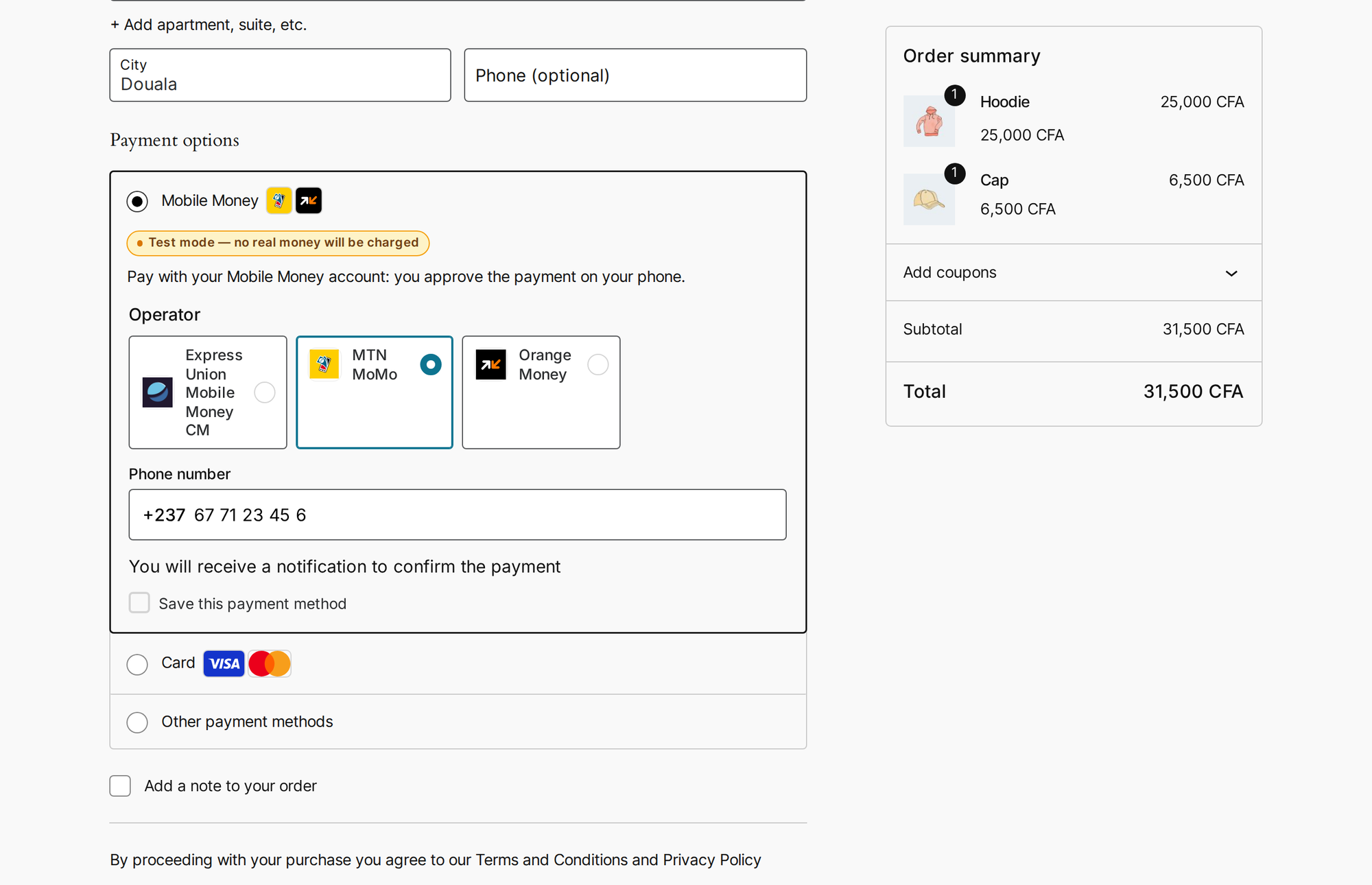
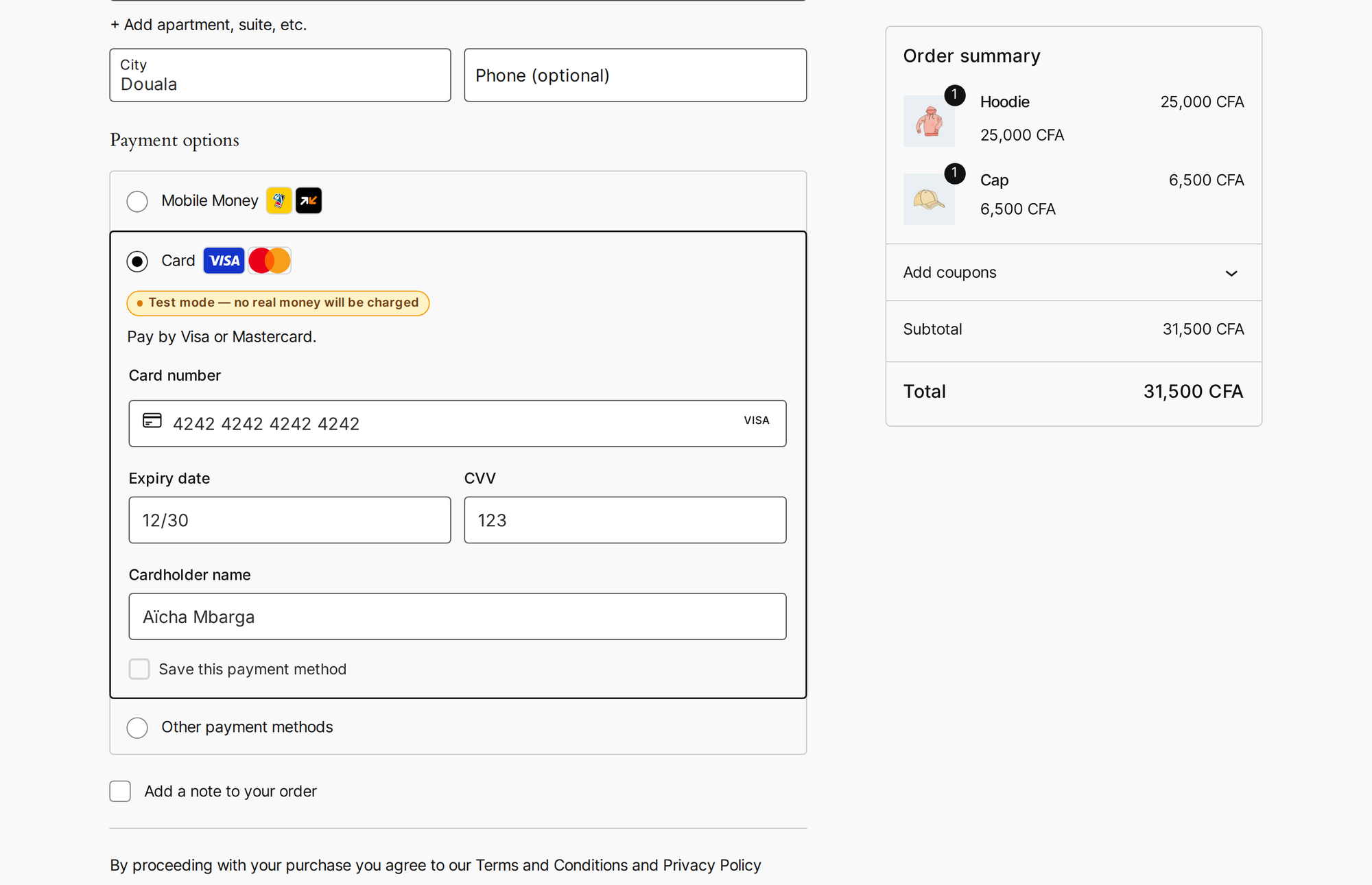
- “Mobile Money” and “Card” can be payment methods of their own, each with Wajub’s payment form inside your WooCommerce checkout (classic and Blocks): payers enter their Mobile Money number or their card without leaving your store. They are off until you turn them on.
- Inline and overlay checkout stay on your checkout page. A payer who closes the payment window or chooses another method keeps their order, and the order page keeps checking until Wajub confirms the payment. In redirect mode, the order page tells a Mobile Money payer what to do on their phone while the payment waits for approval.
- Clear messages when something goes wrong, in words the payer can act on. The technical reason is never shown to the payer: WooCommerce keeps it in a private order note, and with “Log Wajub requests and webhook events” turned on in Wajub Settings (or
WP_DEBUG), it goes to your logs (WooCommerce Status Logs, sourcewajub). - Amounts are shown the way your visitors read them: “25 000 FCFA”, “12,50 €”.
Everything in one place
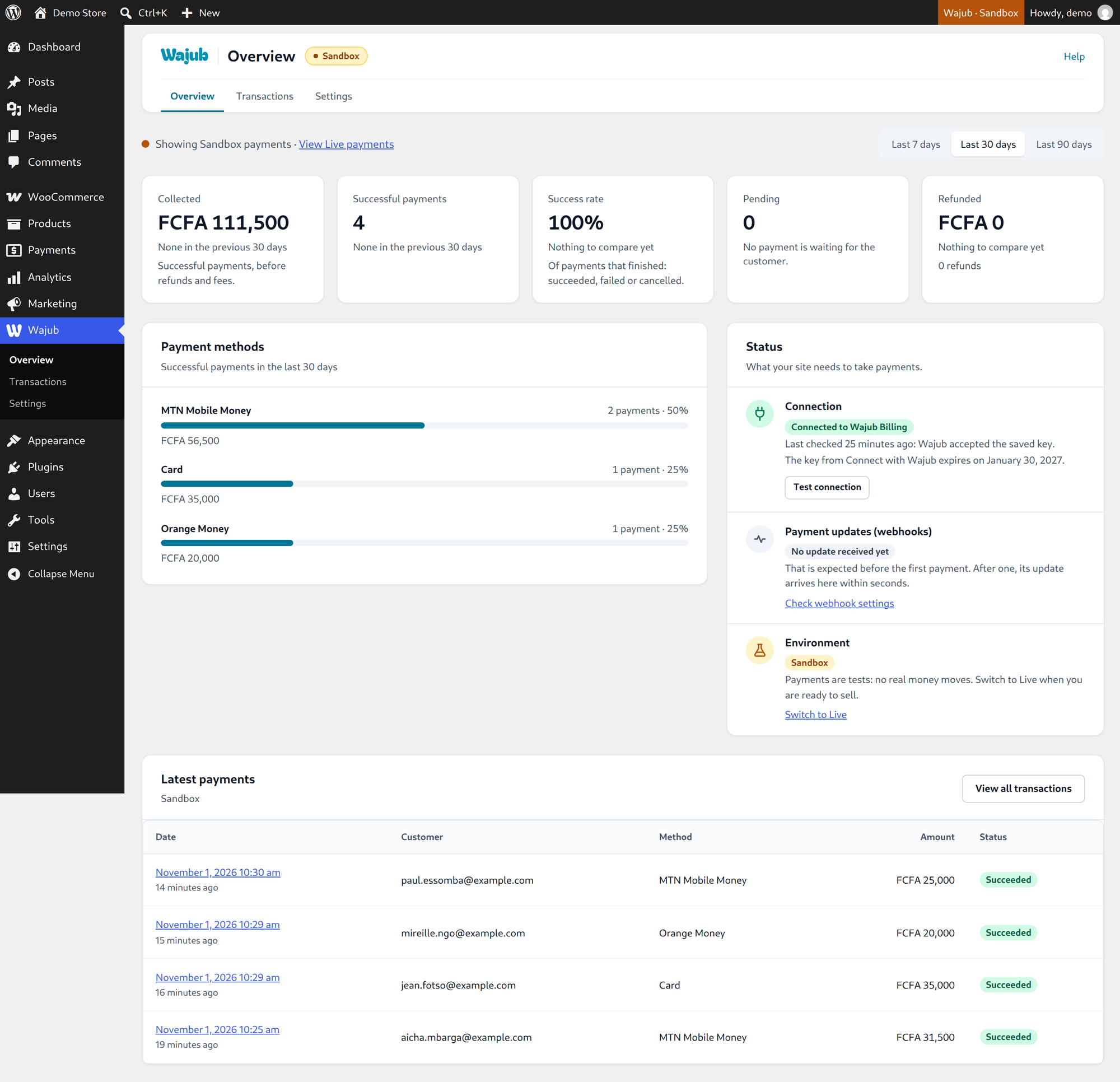
- Wajub Overview: what you collected, success rate, refunds, payment methods and recent payments, by period and environment, plus the health of your connection and webhooks.
- Wajub Transactions: search, filter by status, source, environment and date, open any payment, and export to CSV.
- On each WooCommerce order, a “Wajub payment” box shows the payment, its method and environment, with a link to the Wajub Dashboard.
Supported integrations
- WooCommerce — redirect, inline, or overlay checkout, or separate Mobile Money and Card methods with the payment form in the checkout; Blocks; refunds
- GiveWP — donations (redirect)
- Easy Digital Downloads — digital products
- Charitable — fundraising
- Tutor LMS, LifterLMS, LearnDash — course payments
- MemberPress — one-time membership payments
- Gravity Forms — form payments, with Gravity Forms’ “Payment Completed” and “Payment Refunded” notifications
- Shortcodes —
[wajub_pay],[wajub_pay_content],[wajub_pay_message]
Other form, booking and event plugins have no direct integration: a [wajub_pay] button can take a payment on their pages, but the payment is not recorded in them. Crowdfunding plugins built on WooCommerce pay through the WooCommerce integration.
Checkout modes
- Redirect — customer pays on Wajub hosted checkout
- Inline — checkout embedded directly on the WooCommerce checkout page, no navigation away
- Overlay — modal checkout opened directly on the WooCommerce checkout page, no navigation away
- Separate methods — “Mobile Money” and “Card” are WooCommerce payment methods of their own, each with Wajub’s payment form inside its payment box, no navigation away. Each takes payments of its own kind only, and shows only when your Wajub account offers it for the order. The Wajub method, kept on beside them, becomes “Other payment methods”: it offers only the other ways to pay your account has (PayPal, wallets…), and shows only when there is one.
If Wajub.js cannot load in the payer’s browser, inline and overlay checkouts fall back to the hosted payment page. So do the separate methods, which also use it on the order’s payment page and when their form cannot load; the page then offers that method only.
Shortcodes
[wajub_pay amount="5000" currency="XAF" description="" mode="redirect|inline|overlay" button_text="" class=""]— a pay button (redirect by default).product_id="123"charges a WooCommerce product’s price;type="donation"turns it into a donation form, andamounts="1000,2500,5000"gives that form preset amounts.[wajub_pay_content content_id="premium" amount="2500" currency="XAF" description="" mode="overlay" button_text="" class=""]…[/wajub_pay_content]— content shown once paid (overlay by default).[wajub_pay_message type="success|failure|processing"]— the message of a return page, checked with Wajub.
Default button labels are “Pay %s”, “Donate” and “Unlock for %s”. The pay buttons use your theme’s button styles; the colours can be adjusted with the CSS custom properties listed at the top of assets/css/frontend.css.
For developers
The actions and filters the plugin offers are listed in the FAQ.
External services
This plugin connects to Wajub, a payment service, to take payments. It cannot work without it.
- Wajub API (
https://api.wajub.com). Every request is made with your API key. When a payment starts, the plugin sends the amount, the currency, a description, your order reference and metadata (the plugin, and the order, donation, entry or product the payment is for; for paid content and courses, the ID of the WordPress account that pays, the price, and an identifier of the browser that pays, taken from thewajub_buyercookie described under Privacy), the return URLs, and the payer’s name, email address and phone number when they are known. It reads payments to confirm them, and a payment’s refunds before it counts toward an order, cancels a payment left open when the payer starts another one for the same order, cancels the payment of an order that is cancelled when nobody started paying it, closes an instalment payment the payer can no longer finish (keeping what it collected), and sends refunds you start from WordPress. Checking a key reads the name of your Wajub business. When the setup assistant registers the webhook, it sends your site’s webhook URL, the events it listens to and the description “WordPress: “. - Wajub API, for the Mobile Money and Card methods. The plugin prepares a payment as soon as one of these methods is selected at checkout (it may be selected when the page opens), before the order exists: it sends the amount, the currency, a reference, the description “Order at “, the kind of method (Mobile Money or card) and metadata, and nothing about the payer. It sends the new total when the cart changes, and asks Wajub to keep the payment open longer while the visitor stays on the checkout. When the order is placed, it activates the payment with the payer’s name, email address and phone number, the return URL, the order’s reference and number (“Order #123”) and the order’s ID. A prepared payment that is never activated is charged to no one and expires on its own.
- Wajub API, at checkout and from the admin. When Mobile Money or Card is offered as a payment method of its own, the checkout and the cart ask which kinds of payment methods your account offers for the cart’s currency and total (the currency and amount only). The setup assistant’s checkout step asks the same for your store’s currency, with an example amount. When “Connect with Wajub” replaces a key it gave earlier, the plugin asks Wajub, with that earlier key, to delete it, unless the site is a copy (see the FAQ). Nothing about your customers is sent.
- Wajub.js (
https://js.wajub.com), Wajub’s checkout script, once a key is saved. The visitor’s browser loads it as soon as the page opens, before the visitor chooses how to pay: on the WooCommerce checkout and order payment pages (classic or Blocks), the Cart block page and the mini-cart once opened (WooCommerce loads the payment methods’ scripts there), when the Wajub method uses inline or overlay mode or the Mobile Money or Card method is on; and on any page whose pay button ([wajub_pay],[wajub_pay_content]or a course button) opens the payment in the page. This shows Wajub the visitor’s IP address, browser details and the address of the page. Wajub.js shows the payment form fromhttps://pay.wajub.com. - Wajub’s payment page (
https://pay.wajub.com). In redirect mode, whenever Wajub.js cannot load, and when the Mobile Money or Card form cannot be used (on the order’s payment page, or when the form does not load), the payer goes to the payment page Wajub gives for the payment, opened in your site’s language when Wajub’s checkout has it (French, English, Spanish, Portuguese or Arabic). What the payer types in Wajub’s payment form, on that page or inside your checkout (their card or Mobile Money number), goes straight to Wajub, never through your site, with basic information about their device and browser, which Wajub uses to prevent fraud. - Wajub Dashboard (
https://dashboard.wajub.com), for “Connect with Wajub” only, and only when an administrator clicks one of its buttons: in the setup assistant, in Wajub Settings, or in the admin notice shown when the key it created expires within 14 days or has expired. The site asks the Dashboard for a connection request and sends your site’s name and domain, the environment asked for (Sandbox or Live), the kind of client, a hash of your site’s address, the permissions the plugin needs, and, when the site has a publichttps://address, the setup assistant’s address to come back to. While the request waits for your approval (15 minutes at most), it asks the Dashboard every few seconds whether you approved it, while an admin page that shows the request is open. On approval, it receives the new key, its environment, its type and permissions, the date it expires (or that it does not), and the name of your Wajub business. The Dashboard sees your server’s IP address, and the administrator’s browser opens the Dashboard’s approval page in a new tab.
All of the services above are provided by Wajub. Wajub’s Merchant Terms, End User Terms (for payers) and Privacy Policy apply.
Privacy
- The plugin keeps a record of each payment and refund in its own table (
wp_wajub_transactions, with your table prefix): reference, Wajub id, amount, status, payment method, environment, date, the payer’s email address, the metadata sent with the payment and the last payment details Wajub sent. - Tools Export Personal Data includes these payments (“Wajub payments”) and the content an account paid to open (“Access paid with Wajub”). Tools Erase Personal Data removes the payer’s email address and the stored payment details, and keeps the amount, status, method, date and references, which you need for your accounts. Access to paid content is kept, so the payer does not lose what they paid for.
- Settings Privacy offers suggested text for your privacy policy.
- With the Mobile Money or Card method, the payment prepared for a visitor’s checkout (its Wajub ID and payment token, nothing about the visitor) is kept for that visitor’s WooCommerce session, as a temporary entry of its own (a WordPress transient), until the order is placed, the cart is emptied or two days have passed. For a visitor who has no WooCommerce session cookie yet, the plugin asks WooCommerce to set it, so that the payment is still there when they place the order.
- When someone starts a payment for locked content (
[wajub_pay_content]) or for a LearnDash, LifterLMS or Tutor LMS course with the Wajub button, the plugin sets thewajub_buyercookie in their browser: a random identifier, kept 30 days, so that what they paid for opens in that browser once paid, with or without an account. The plugin sets no other cookie of its own.
Uninstall
Deleting the plugin removes what it stored, on every site of a network: its settings (those of the Mobile Money and Card methods included), keys and secrets, the record of which keys “Connect with Wajub” gave (their fingerprint, business and dates, never the key), the record of which of its updates ran, its payments table, its temporary data, the expiry e-mails it scheduled for those keys, the Gravity Forms feeds that use Wajub, its users’ screen preferences, and the record of which accounts paid for locked content and LearnDash courses (LearnDash keeps the enrolments themselves; a reinstall does not bring the record back). The return pages it created are moved to the trash if you never edited them. Orders, donations, entries and transactions keep their Wajub details (the _wajub_* meta, wajub_* on Gravity Forms entries and MemberPress transactions, and their notes): they are your sales history. The webhook endpoints registered in your Wajub account stay, and so do the API keys “Connect with Wajub” created: delete them in the Wajub Dashboard (Settings Developers API keys). The Wajub settings that other plugins keep among their own (the payment method enabled in Easy Digital Downloads, GiveWP, Charitable, MemberPress or Tutor LMS) and WooCommerce’s log files for the wajub source stay with those plugins.
Details


Related plugins
Plugins that also contain the tag donations
Donations via PayPal

GiveWP Donation Widgets for Elementor
Potent Donations for WooCommerce

Leyka

Give – Paystack Gateway

WPC Order Tip for WooCommerce


About
Plugin for that tries to help you find the WordPress plugin you are looking for.
| Please enjoy an image of Crush (this awesome turtle) and have a lovely day! |  |
We do not own any plugin listed on this site and do not work for or work with WordPress.com or it's associated companies. We simply provide a searchable list of the available WordPress plugins.