


Back

Weblink Event Calendar
Details
View on WordPress
Back
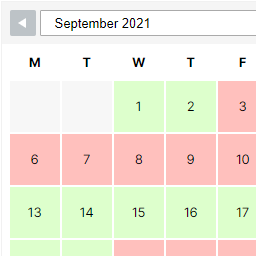
Weblink Event Calendar lets you manage a calendar of events and display it on your site with a simple shortcode. Every event is shown with the calendar’s own color, so visitors can spot it at a glance.
This plugin includes:
- One customizable category (name + color) for all your events
- Unlimited events, single-day or multi-day, with optional notes
- A responsive, front-end monthly calendar view via the
[eacal_calendar]shortcode - Bulk delete for events from the admin list
- A clean admin UI with a color picker
Upgrade to PRO
Need more than one category, CSV import/export, or multilingual support? Easy Calendar PRO by Weblink adds:
- Multiple color-coded categories
- CSV import/export for categories and events, with duplicate detection
- WPML compatibility, to translate event titles and notes across languages
- Priority support and updates
How it works
- Customize your calendar’s category (name + color) under Weblink Event Calendar Categoria.
- Add events under Weblink Event Calendar Events: title, single day or date range, optional notes.
- Paste
[eacal_calendar]into any page or post to display the calendar.
Visitors see a monthly grid with color-coded events and a tooltip with the event details on hover.
Details
Plugin code:
weblink-event-calendar
Plugin version:
1.0.0
Author:
Outdated:
No
WP version:
5.6 or higher
PHP version:
7.4 or higher
Test up to WP version:
7.1
Total installations:
0
Last updated:
2026-08-28
Rating:
Times rated:
0
calendar
category
event-calendar
events
shortcode


Related plugins
Plugins that also contain the tag calendar
The Events Calendar

LatePoint – Calendar Booking Plugin for Appointments and Events

Woo Store Vacation

SimplyBook.me – Booking and reservations calendar

The Events Calendar Shortcode & Block

WP Simple Booking Calendar

About
Plugin for that tries to help you find the WordPress plugin you are looking for.
| Please enjoy an image of Crush (this awesome turtle) and have a lovely day! |  |
We do not own any plugin listed on this site and do not work for or work with WordPress.com or it's associated companies. We simply provide a searchable list of the available WordPress plugins.