


WebStyle Personal Coupons for WooCommerce
WebStyle Personal Coupons lets you run coupon campaigns. A campaign gives every customer their own code, or one shared code with limits, and groups into categories so you can see what each campaign brought in.
Personal codes
- One code per e-mail address and campaign. Asking again for the same address returns the same code, so a resent e-mail never hands out a second code.
- Codes can be bound to the recipient’s e-mail address.
- Set how many codes a campaign may issue, and how many times each code may be used.
- Valid until a fixed date, or for a number of days after the code is issued.
- Readable codes with your own prefix, without characters that are easily mistaken (0/O, 1/I).
Shared codes
- One code you choose yourself, for example FOD20 for every member of a club.
- Limit the total number of uses (“the first 100”) and the uses per e-mail address.
For every campaign
- Percentage or fixed discount on the products.
- Decide what the code covers: only or not for specific products, categories, tags and attribute values such as Colour: Red (also on variations), and whether sale items get the discount.
- The discount lands only on the covered items, for a fixed amount too, so a cart with other items can still use the code.
- Limit the code to certain countries, or exclude countries, by shipping or billing address.
- Minimum and maximum cart amount.
- Start and end date.
- Categories, for example “Winter sale”, to compare campaigns over the years.
- A use is counted when the order is placed and given back if the order is cancelled, refunded or fails.
- Works with the classic checkout and the Cart and Checkout blocks, and with High-Performance Order Storage.
Campaign screen
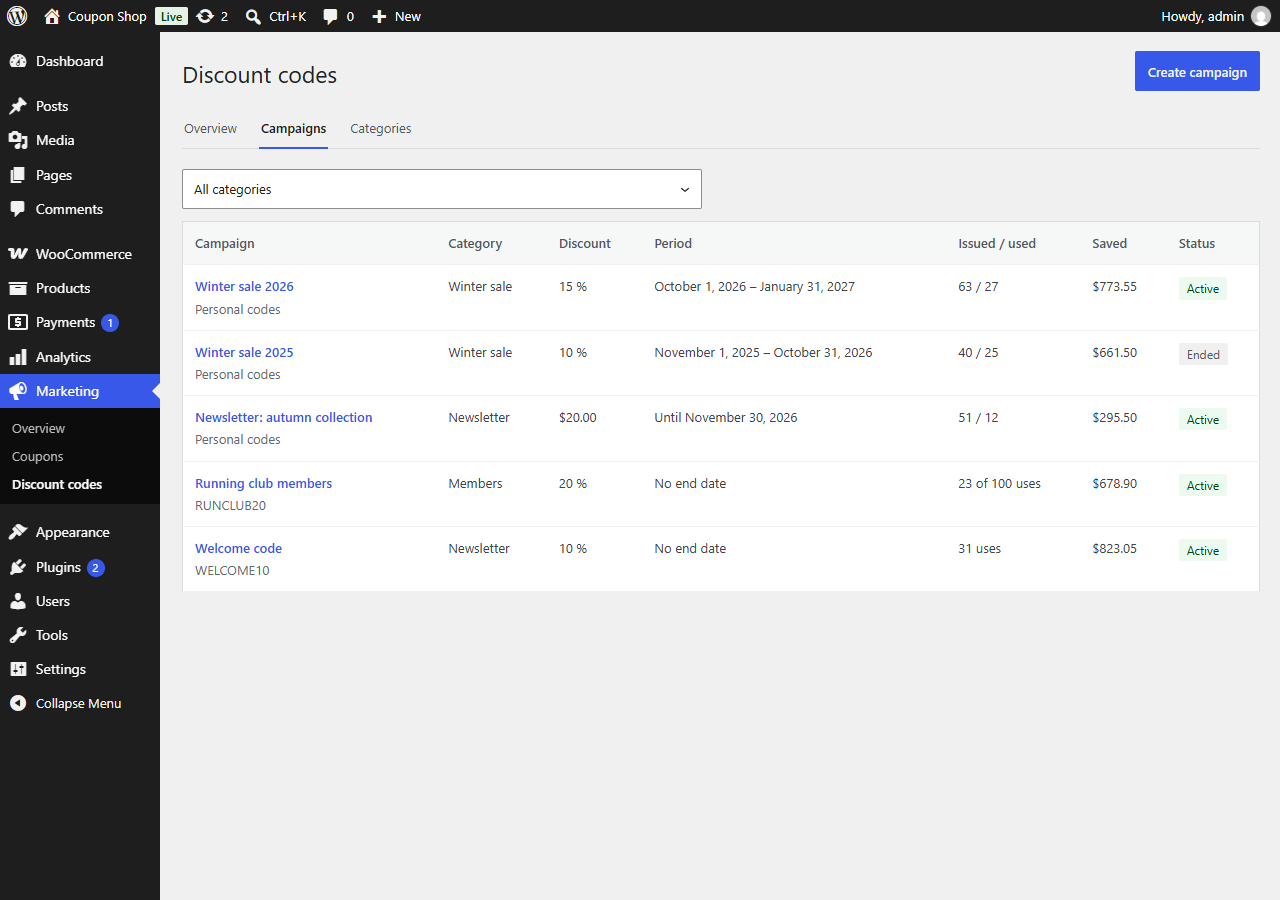
Under Marketing Discount codes the overview shows the codes issued and redeemed, what customers saved and the revenue for the last week, month, 3 months or any interval, per category and campaign, with a chart and a CSV export. A short guide walks you through a new campaign in four steps and sums up the rules in plain words before you save. Every product, category, tag, attribute value and country can be picked from a list you can browse and search, and a new category can be created right where you choose it. The discount step shows how WooCommerce calculates shipping in your shop with the code: your free-shipping thresholds per zone, whether they are measured before or after the discount, and an example with the discount you entered. Each campaign has its own page with the codes issued and used, what customers saved and the revenue from orders with a code. Paste e-mail addresses or upload a CSV file to issue personal codes, and download all codes as CSV.
The discount step mentions three of our paid plugins where they answer the question at hand: WebStyle Accounting Sync under the discount (bookkeeping), Checkout Optimizer Pro under shipping (free shipping with a code) and WebStyle Mail under sending personal codes. Each mention can be closed for good and is not shown when that plugin is active.
Codes are kept in the plugin’s own database tables instead of as WooCommerce coupon posts, so thousands of personal codes do not slow down your shop.
Sending codes
Other plugins can issue codes through a filter. WebStyle Mail uses it to put a personal code in each newsletter.
For developers
Issue or fetch a recipient’s personal code in a campaign:
$code = apply_filters( 'cnwscoupons_issue_code', '', array( 'campaign' => 'spring-offer', 'email' => 'customer@example.com', 'source' => 'my-plugin' ) );
The filter returns an empty string when the campaign does not exist, has ended, has issued all its codes, has a shared code, or the e-mail address is invalid.
List active campaigns with personal codes (slug => name):
$campaigns = apply_filters( 'cnwscoupons_active_campaigns', array() );
Add-ons can change the WooCommerce coupon a code produces with the cnwscoupons_coupon_data filter, store their own settings on a campaign (cnwscoupons_extension_sanitizers), add fields to the campaign guide with the JavaScript filter cnwscoupons.guide.shipping, and look up a code’s campaign with cnwscoupons_campaign_for_code.
WP-CLI: wp webstyle-coupons create-campaign, list-campaigns, issue and codes.
Details


Related plugins
Plugins that also contain the tag coupons
Advanced Dynamic Pricing and Discount Rules for WooCommerce

Extended Coupon Features for WooCommerce FREE

Auto Coupons for WooCommerce

Loyalty Points Rewards and Referral for WooCommerce – WPLoyalty

Coupons & Add to Cart by URL Links for WooCommerce

WP Coupons and Deals – WordPress Coupon Plugin


About
Plugin for that tries to help you find the WordPress plugin you are looking for.
| Please enjoy an image of Crush (this awesome turtle) and have a lovely day! |  |
We do not own any plugin listed on this site and do not work for or work with WordPress.com or it's associated companies. We simply provide a searchable list of the available WordPress plugins.