


Wizup Forms
Turn website inquiries into leads in Wizup.
Wizup Forms connects Elementor Pro Forms and Contact Form 7 to your Wizup lead management account. Choose the form fields to send, select a lead stage, and keep new inquiries in the system your team uses to follow up.
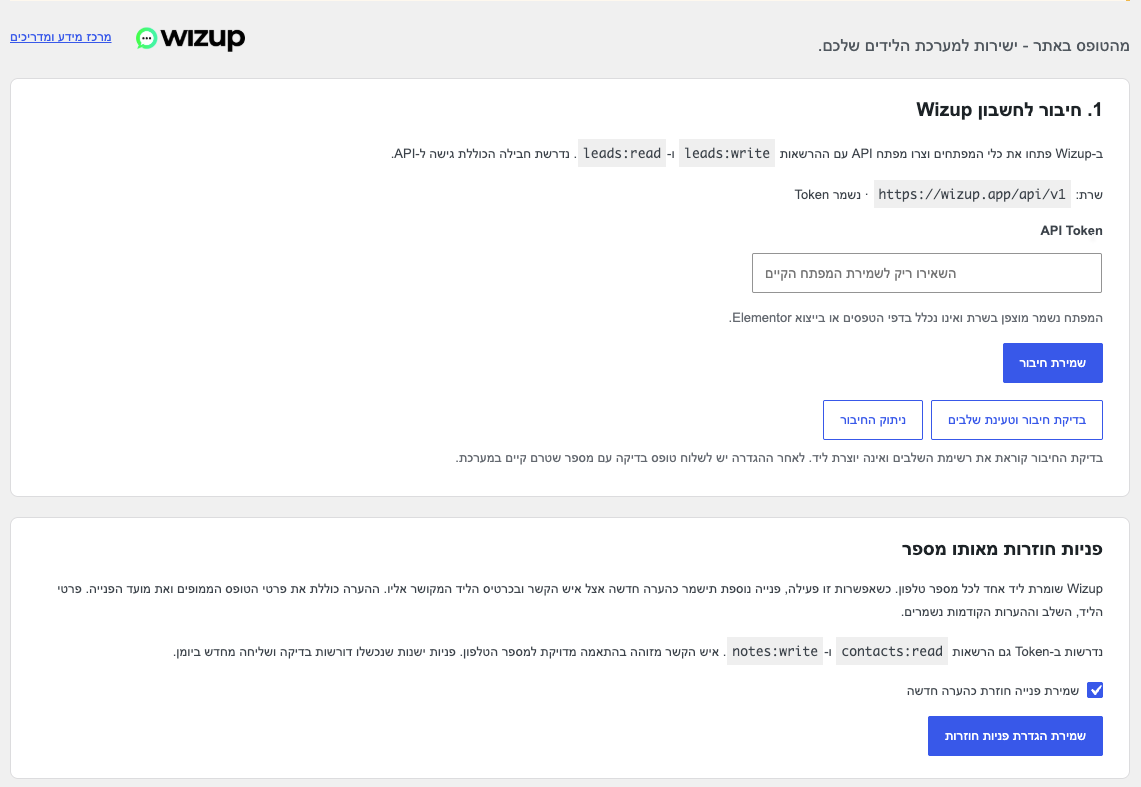
The plugin adds a Wizup action under Elementor’s Actions After Submit and a Wizup settings tab in Contact Form 7. Connect your account once with an API token, then enable the connection for each form you want to use. No separate webhook or automation service is required.
The plugin is free and open source. It connects to the external Wizup service, which requires a Wizup account on a plan that includes API access. Elementor Pro or Contact Form 7 must be installed separately. The plugin’s administration interface and built-in guide are currently in Hebrew, with right-to-left layouts.
Features
- Send validated form submissions to the existing Wizup lead API.
- Select actual form fields for name, phone, email and an optional last name.
- Use automatic name, phone and email detection in Elementor, or choose fields manually.
- Choose a lead stage from your Wizup account.
- Map message content and other fields to existing custom fields in Wizup.
- Normalize local phone numbers using a configurable country code. The default is 972 for Israel.
- Optionally save repeat inquiries from the same phone number as new notes on the existing contact, mirrored to its linked lead.
- Process delivery in the background with an encrypted queue, bounded retries and stable request identifiers.
- Review delivery status, retry eligible failures and view private validation diagnostics from the settings page.
- Open the Wizup website and help center directly from the plugin.
Repeated inquiries
Wizup keeps one lead per phone number. If a visitor contacts you again, the optional repeat inquiry setting can preserve the new inquiry as a note instead of creating another lead.
This option is off by default. It requires contacts:read and notes:write permissions in addition to the lead permissions. The plugin uses it only after Wizup explicitly rejects a duplicate phone number and an exact phone match is found. Existing lead details, stage and earlier notes are preserved. Each note includes the mapped form data and original inquiry time. Long inquiries may be split into numbered notes.
Other validation errors are not treated as duplicate inquiries. Earlier failed submissions require an explicit recheck from the delivery log. Note deliveries already in progress can finish if the option is later turned off.
Message fields and custom fields
Create the destination custom field in Wizup first. For a message, use a long text field. Add a custom mapping in the form, select the message field, and enter the destination field’s internal key, not its display label. A field named “Message” might have a key such as field_ab12cd34; this is an example, not a universal key.
The built-in Hebrew guide explains how to open your Wizup lead settings, create a field, and use browser DevTools to inspect the field’s label, key and type. The plugin does not automatically fetch or create your custom field definitions. Only explicitly mapped fields are sent. File uploads, lead sources and products are not supported. Marketing consent is not enabled automatically.
External service and privacy
This plugin connects your WordPress site to Wizup at https://wizup.app/api/v1. It makes authenticated HTTPS requests using the API token you enter. A Wizup account with API access is required to use this integration.
Requests are made only for the configured integration:
- When you click the connection test, the plugin reads your lead stages. This does not create a lead.
- After an enabled form passes validation, background delivery sends its mapped name, phone number, optional email, chosen stage and custom field values to create a lead.
- If repeat inquiry handling is enabled and Wizup confirms a duplicate phone number, the plugin searches contacts by phone and sends note content containing the mapped values, original submission time, form source and form ID.
- Manual retries and scheduled retries may repeat these requests using the same operation identifiers.
The token is sent in an authorization header. The API receives your server’s connection information and the plugin’s user agent as part of normal HTTP requests. The plugin does not send analytics or telemetry and does not load remote tracking assets.
Tokens and queued form data are encrypted in the WordPress database using OpenSSL and keys derived from WordPress authentication salts. Changing the salts makes existing encrypted data unreadable. Delivered payloads are erased from the local queue after completion. Logs, undelivered payloads and stored diagnostics expire after 14 days when WP-Cron runs. The status table does not display names, phone numbers or message content; administrators can separately open encrypted validation details when available.
Deactivation preserves the queue. Uninstall removes this site’s plugin options, queue table and Contact Form 7 mapping metadata. Elementor mappings remain in page content, without the API token. Removing local data does not delete records already sent to Wizup.
Site owners should explain the transfer of form data to Wizup in their own privacy notice and configure any consent fields appropriate to their forms.
Wizup Forms is developed by Wizup. Elementor and Contact Form 7 are separate third-party products. Their names identify supported integrations and do not imply endorsement by their developers.
Details


Related plugins
Plugins that also contain the tag contact-form-7
ReCaptcha v2 for Contact Form 7

Contact Form 7 Captcha

Contact Form 7 – Dynamic Text Extension

Conditional Fields for Contact Form 7

Image CAPTCHA for Contact Form 7 and WPForms by HookAndHook (DSGVO/GDPR)

Database for Contact Form 7, WPforms, Elementor forms


About
Plugin for that tries to help you find the WordPress plugin you are looking for.
| Please enjoy an image of Crush (this awesome turtle) and have a lovely day! |  |
We do not own any plugin listed on this site and do not work for or work with WordPress.com or it's associated companies. We simply provide a searchable list of the available WordPress plugins.