



Dynamic Product Gallery for WooCommerce
Science has proven that Product images have a massive impact on your stores conversion rates. Dynamic Product Gallery for WooCommerce will bring your stores static image display to life.
As soon as you install Dynamic Gallery your Product pages image gallery is transformed into a dynamic scrolling product gallery with thumbnails displayed in a single row slider.
KEY FEATURES
- A Dynamic Product Page image gallery for WooCommerce Products page.
- Full support for WordPress responsive images – srcset and size
- Full support for Webp images
- Supports .jpg and .png images converted to Webp using HTML, replace URL attributes.
- Fully integrated with WooCommerce Product Gallery
- Full compatibility with WooCommerce version 8.0
- Fully Compatible with Elementor Premium Templates
- Dynamic Gallery shortcodes. Works with page builders like Elementor, Divi etc.
- NEW Product Gallery Block – Use with WooCommerce Single Product page Block Template
PRODUCT GALLERY
- Instantly applies Dynamic Gallery features to all WooCommerce Product Gallery images on install
- Auto Converts your static product image galleries into a dynamic scrolling gallery
- Auto converts you static Product image thumbnails into a dynamic single row thumbnail slider
- Displays all of your product images beautifully in all PC, Tablet and mobile phone browsers
- Simple to use – just install and continue to use the WooCommerce Product gallery to add, move and delete product images
- Search Engine friendly images
- Dynamic Gallery ON | OFF setting for single products
- Built in Lazy-load feature
- Support for image captions
- 2 Choices of Gallery width FIXED or DYNAMIC
- 2 Choices of Gallery Height – FIXED (set in px) or DYNAMIC
- ZOOM – shows full size image with caption text and manual scroll through entire gallery.
- Choice of 2 different pop-up tools – Fancybox and Colorbox.
- ZOOM | START SLIDE SHOW / STOP SLIDESHOW controls
* NEW WIGET & SHORTCODE
Dynamic Gallery automatically replaces the default WooCommerce Product Gallery on product pages. The Dynamic Gallery Widget and Shortcode enable you to:
- Shop Shortcode – use it to add Dynamic gallery to new WooCommerce FSE Single Product Block Template
- Shop Shortcode – use it to add Dynamic gallery to page builders WooCommerce Product Page Template.
- Single Shortcode – Use to insert a Single Product Gallery, by product id into anywhere that accepts shortcodes
- Widget – Add a single product Dynamic Gallery to any widget area
- Elementor Product Page Template – Add the WooCommerce Dynamic Gallery to your Elementor Product Page template via the Dynamic Gallery Widget or Shop Shortcode.
GALLERY THUMBNAIL SLIDER
- Gallery Thumbnails show in a single row slider under the Gallery
- Option to set the number of thumbnails that are visible in the Thumbnail slider from 2 to 8.
- Option to set Thumbnail auto don’t show when there is only 1 image in the gallery
- Thumbnails auto scale to size in smaller screens
THINGS TO KNOW
- Dynamic Gallery admin panel is found in the WooCommerce submenu on your wp-admin page
- Dynamic Gallery is found on the WooCommerce Single Product Template
- The Gallery uses the default WooCommerce Main Image size. The sizes for these are set on the Customiser menu > WooCommerce > Product images.
- Gallery thumbnails are the default WooCommerce square cropped 100×100 pixels. WooCommerce allows changing this by filtering on woocommerce_gallery_thumbnail
- Translation ready and fully compatible with WPMU
PREMIUM VERSION
There is a Premium Version of Dynamic Gallery for WooCommerce available if you find you want more features than are available in the free version
CONTRIBUTE
When you download Dynamic Product Gallery for WooCommerce, you join our the a3rev Software community. Regardless of if you are a WordPress beginner or experienced developer if you are interested in contributing to the future development of Dynamic Gallery or any of our other plugins on Github head over to the Dynamic Product Gallery GitHub Repository to find out how you can contribute.
Want to add a new language? You can contribute via translate.wordpress.org
Usage
-
Go to WordPress admin > WooCommerce menu > Dynamic Gallery menu
-
On the Settings tab activate the gallery and tweak settings as required
-
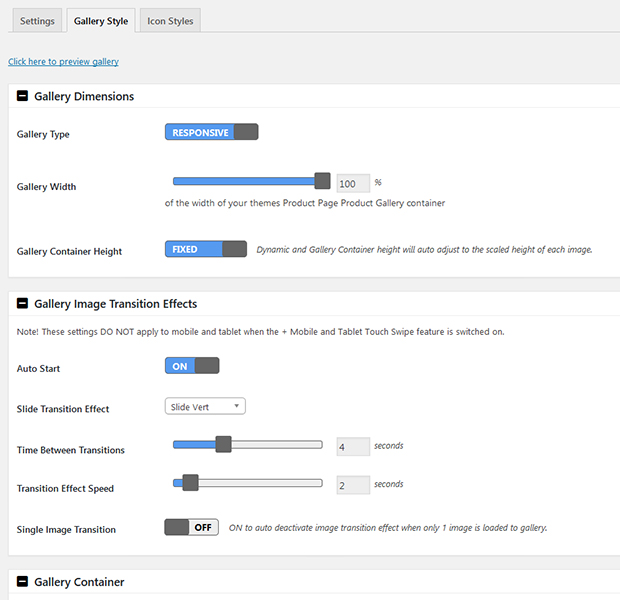
On the Gallery Style tab set layout, style and features of your product gallery
-
On the Icon Styles menu style your gallery icons
-
On any product edit page on the WooCommerce Product Data menu go to the Dynamic gallery menu and set the way the gallery works for that product
-
Enjoy
Details


Related plugins
Plugins that also contain the tag woocommerce
Google for WooCommerce

WooCommerce PayPal Payments

WooCommerce Stripe Payment Gateway

WooCommerce Tax (formerly WooCommerce Shipping & Tax)

WooCommerce Legacy REST API

Pinterest for WooCommerce


About
Plugin for that tries to help you find the WordPress plugin you are looking for.
| Please enjoy an image of Crush (this awesome turtle) and have a lovely day! |  |
We do not own any plugin listed on this site and do not work for or work with WordPress.com or it's associated companies. We simply provide a searchable list of the available WordPress plugins.