


WP Marvelous Debug
This plugin allows viewing the log file (debug.log) on the Dashboard and editing the debugging constants from wp-config.php. It also provides other debugging oriented features.
The log file is loaded on the Dashboard (Tools > Log File) using the /SplFileObject class, optimized for memory usage, and it will use a pagination in order to load only some lines from it.
The plugin will try to enable WP_DEBUG and WP_DEBUG_LOG to true and disable WP_DEBUG_DISPLAY on its first run and will try to do the opposite when it’s deactivated.
You can change this behaviour if you want in the settings.
WP Config Constants
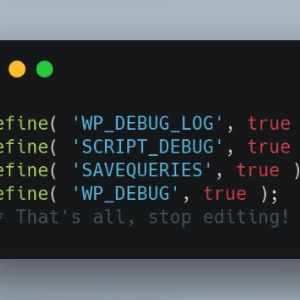
The wp-config.php is being edited using wp-cli/wp-config-transformer library, and these are the edited constants:
WP_DEBUGWP_DEBUG_LOGWP_DEBUG_DISPLAYSCRIPT_DEBUGSAVEQUERIES
Generate a reduced log file
It’s possible to generate a reduced duplicate log file (debug-reduced.log) from the original one loading only the last lines from it (something like the tail command from Linux).
Details


Related plugins
Plugins that also contain the tag debug
WP Crontrol

Query Monitor – The developer tools panel for WordPress

Debug Bar

Debug Log Manager – Conveniently Monitor and Inspect Errors

WP Debugging
Code Profiler – WordPress Performance Profiling and Debugging Made Easy


About
Plugin for that tries to help you find the WordPress plugin you are looking for.
| Please enjoy an image of Crush (this awesome turtle) and have a lovely day! |  |
We do not own any plugin listed on this site and do not work for or work with WordPress.com or it's associated companies. We simply provide a searchable list of the available WordPress plugins.