


WPSwings Wishlist for WooCommerce
WPSwings Wishlist for WooCommerce adds an “Add to wishlist” button to your WooCommerce products. Customers can save products, organize them into multiple named wishlists, share a list through a public link, and receive an email when a saved product’s price drops or it comes back in stock.
On activation the plugin creates a “My Wishlist” page containing the [wpwishfw] shortcode, where customers view and manage their lists. Store owners configure the button, the wishlist page, sharing, emails and alerts from WPSwings Wishlist Settings, and can review wishlist activity under WPSwings Wishlist Dashboard and WPSwings Wishlist Wishlists.
KEY FEATURES
🎯 Core Wishlist Functionality
- Multiple Wishlists – Create unlimited wishlists with custom names
- Guest Wishlists – Anonymous visitors can save items without an account
- Persistent Wishlists – Saved across devices and sessions for registered users
- Quick Add/Remove – One-click buttons everywhere
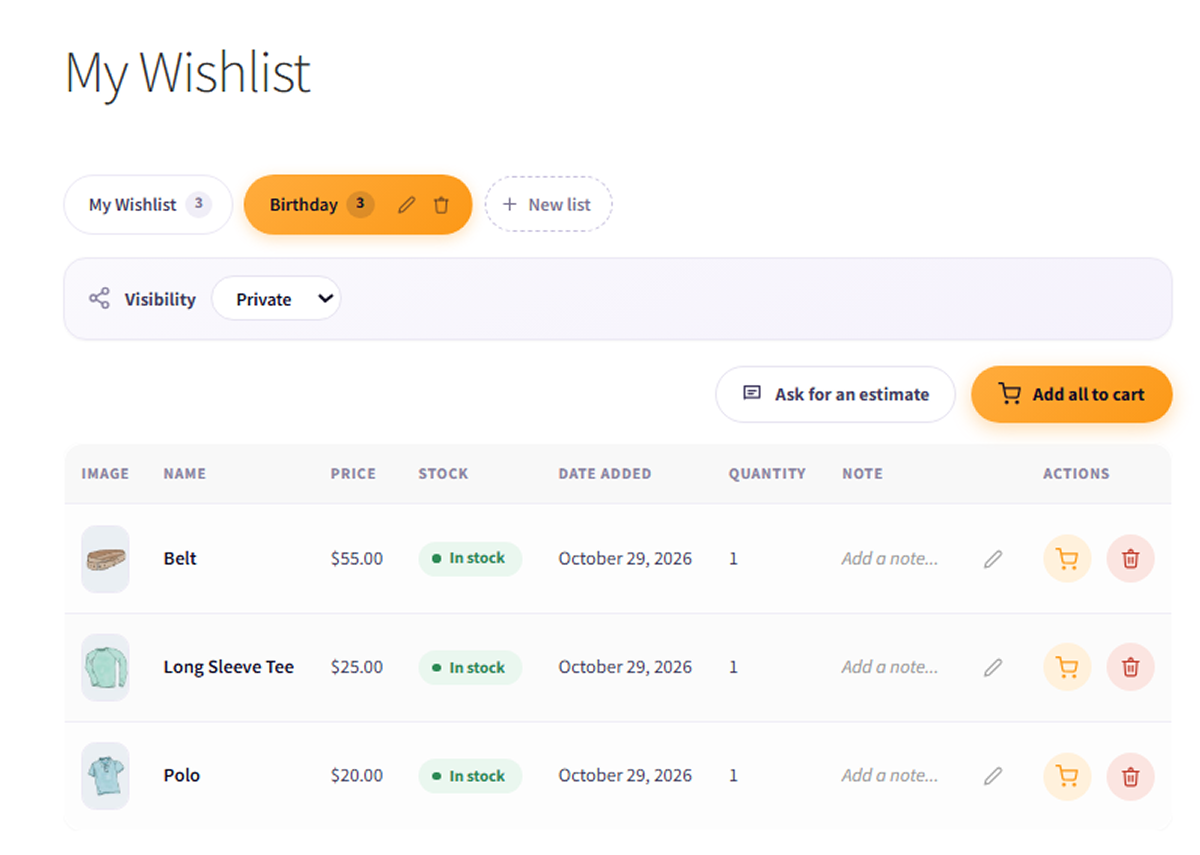
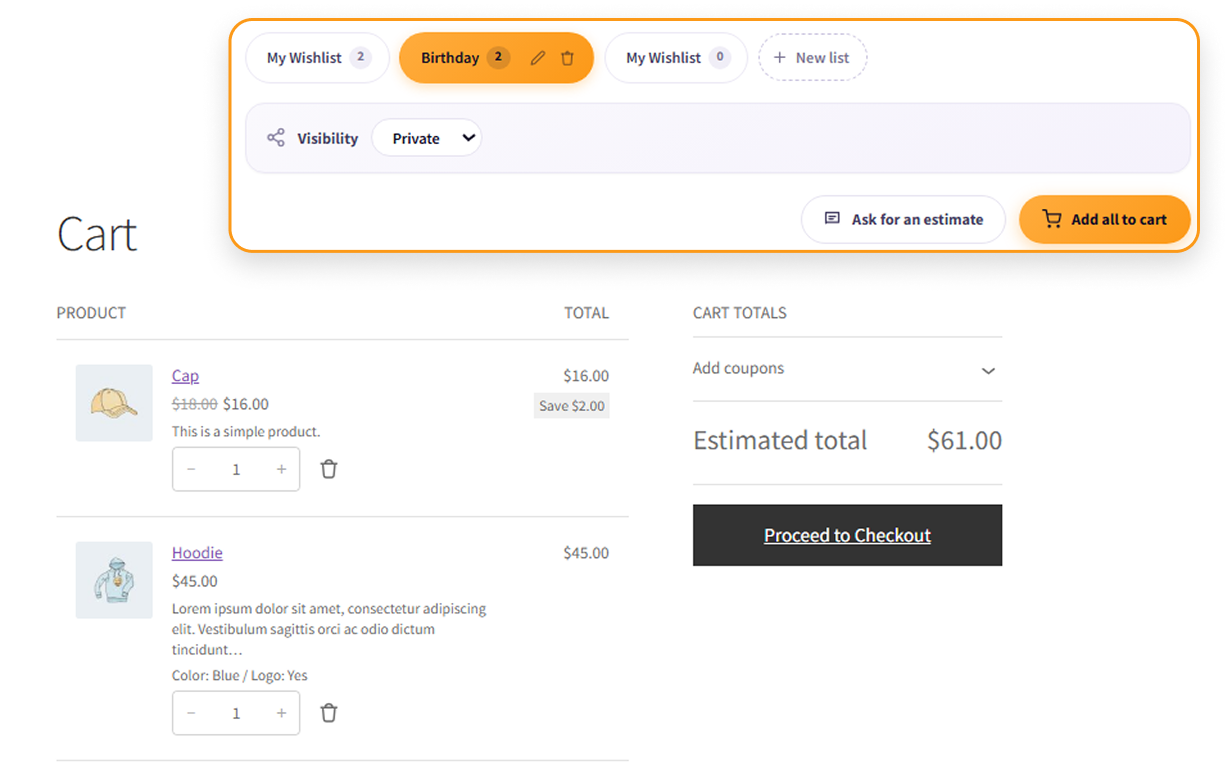
- Bulk Actions – Add all wishlist items to cart at once
🔔 Smart Alerts
- Price Drop Notifications – Email alerts when items go on sale
- Back-in-Stock Alerts – Get notified when products return
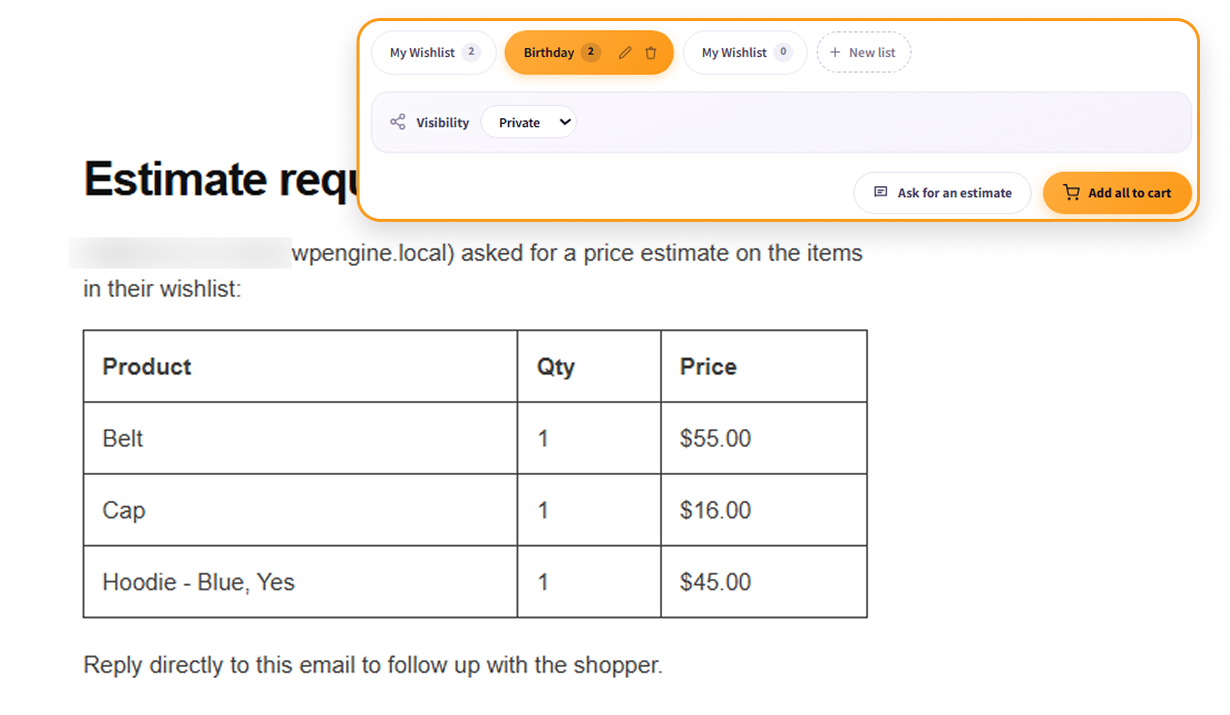
- Ask for an Estimate – Signed-in shoppers can email their list to the store for a quote
- Customizable Templates – Personalize email designs
🔗 Social Sharing
- Public Wishlists – Share via unique URLs
- Privacy Controls – Private or Public
- Share Buttons – Facebook, X, WhatsApp, and more
- Gift Registry – Share a public list for weddings, birthdays and other occasions
📊 Analytics Dashboard
- Real-time Metrics – Track wishlists, conversions, and alerts
- Visual Charts – Activity over 7d/30d/90d periods
- Purchase Funnel – See customer journey
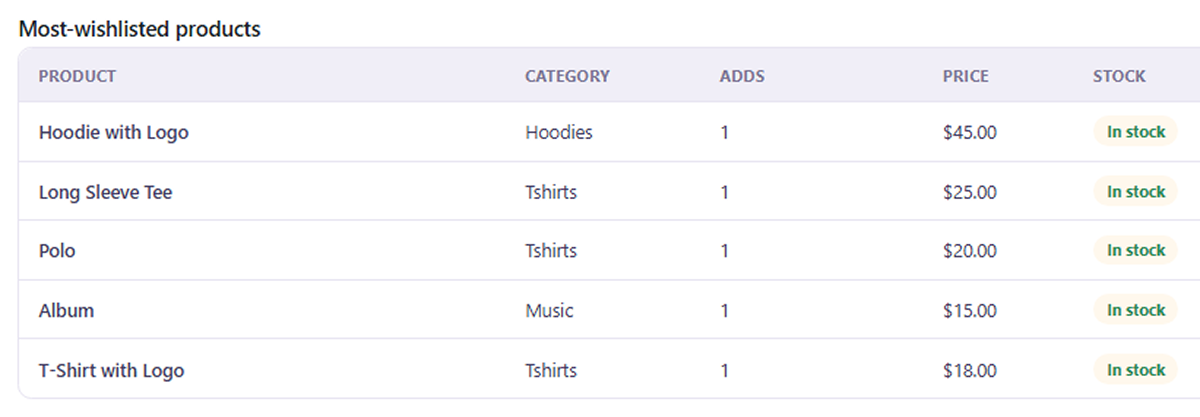
- Top Products – Most wishlisted items
🎨 Customization Options
- Button Styles – Icon, icon+text, or text only
- Custom Labels – Match your brand voice
- Table Columns – Configure wishlist page display
- Flexible Positioning – Control button placement
🎯 Marketing Tools
- Promotional Targeting – Export customer emails by product
- CSV Export – Download customer lists
- Customer Insights – Understand purchase intent
🔧 Compatibility
- HPOS Compatible (High-Performance Order Storage)
- Gutenberg Blocks Included
- WPML/Polylang Compatible (including the custom button label)
- Cache-friendly: button state refreshes after the page loads
- GDPR: works with WordPress’s personal data export and erase tools
- Read-only REST endpoint for a customer’s own lists
HOW TO CONFIGURE
All settings are under WPSwings Wishlist Settings, split into tabs:
- General – Remove items from the wishlist after they are added to the cart or purchased, turn price-drop and back-in-stock alerts on or off, and set how many days a guest wishlist is kept.
- Button – Choose the button style (icon, icon + text, or text), the button label, icon size, color and spacing, and where the button appears (product page and/or shop loop).
- Wishlist Page – Choose which table columns customers see on the wishlist page and whether to show the “Add all to cart” button.
- Sharing – Choose which share buttons (Facebook, X, WhatsApp, Pinterest, Telegram, Email) appear on public wishlists.
- Emails – Turn the price-drop, back-in-stock, ask-for-estimate and guest-merge emails on or off. Use each email’s “Preview Template” link to edit its subject and content in WooCommerce Settings Emails.
- Advanced – Cache-safe button loading, GDPR export/erase support, debug logging, and whether to delete all plugin data when the plugin is deleted.
HOW TO USE
- Customers click the heart / “Add to wishlist” button on a product to save it. They manage their lists on the “My Wishlist” page, where they can create new lists, set a list to Private or Public, share a public list, add items to the cart, or request an estimate.
- Store owners see activity, conversions and the most-wishlisted products under WPSwings Wishlist Dashboard, and browse every customer list under WPSwings Wishlist Wishlists. From the Wishlists screen, use Promotional targeting to export (CSV) the customers who saved a specific product.
- Shortcode and blocks – Place the wishlist on any page with the
[wpwishfw]shortcode, or use the “Add to Wishlist Button”, “Wishlist Counter” and “Wishlist” blocks in the block editor.
Support
For support:
- Visit the support forum
- Contact us at wpswings.com
External services
This plugin can show social share buttons on a wishlist page so customers can share their wishlist. The store owner chooses which buttons appear under Wishlist > Settings > Sharing (Facebook, WhatsApp and Email are enabled by default).
Nothing is sent to these services automatically: no data leaves your site when the wishlist page loads, and the plugin makes no server-side requests to them. Each button is a plain link. Data is sent only when a visitor clicks a share button on a wishlist whose visibility is set to Public; the visitor’s browser then opens the service’s website or app with the data listed below in the URL. The service also receives whatever its own website normally collects from the visitor’s browser (for example IP address and cookies), under its own terms.
Used to share a wishlist on Facebook. When a visitor clicks the Facebook share button, the wishlist’s share link is sent to https://www.facebook.com/sharer/sharer.php.
This service is provided by Meta Platforms, Inc.: terms of service, privacy policy.
X (formerly Twitter)
Used to share a wishlist on X. When a visitor clicks the X share button, the wishlist’s share link and the wishlist title are sent to https://twitter.com/intent/tweet.
This service is provided by X Corp.: terms of service, privacy policy.
Used to share a wishlist on WhatsApp. When a visitor clicks the WhatsApp share button, the wishlist title and its share link are sent to https://api.whatsapp.com/send.
This service is provided by WhatsApp LLC (Meta): terms of service, privacy policy.
Used to share a wishlist on Pinterest. When a visitor clicks the Pinterest share button, the wishlist’s share link and the wishlist title are sent to https://pinterest.com/pin/create/button/.
This service is provided by Pinterest, Inc.: terms of service, privacy policy.
Telegram
Used to share a wishlist on Telegram. When a visitor clicks the Telegram share button, the wishlist’s share link and the wishlist title are sent to https://t.me/share/url.
This service is provided by Telegram Messenger Inc.: terms of service, privacy policy.
The Email share button uses a mailto: link, which opens the visitor’s own email program with the wishlist title and share link filled in. It does not contact any external service.
The share link contains a random token that identifies the wishlist; it contains no personal data. No email addresses, account details or wishlist contents are sent to any of these services.
Privacy Policy
WPSwings Wishlist for WooCommerce uses cookies to store guest wishlist data for 30 days (configurable). For registered users, wishlist data is stored in the WordPress database. The plugin does not send data to external services except when a visitor clicks a social share button on a public wishlist; see the External services section above for what is sent and to whom.
Email addresses are collected only for logged-in customers who add items to wishlists, and are used solely for sending price drop and back-in-stock alerts. No data is shared with third parties.
Store administrators can export and delete customer wishlist data through the admin panel, ensuring GDPR compliance.
Details




Related plugins
Plugins that also contain the tag product-wishlist
QODE Wishlist for WooCommerce

Addonify – WooCommerce Wishlist

WishSuite – Wishlist for WooCommerce

Flexible Wishlist for WooCommerce – Ecommerce Wishlist & Save for later

Airy Wishlist for WooCommerce

Velocity Wishlist – WooCommerce Wishlist Plugin


About
Plugin for that tries to help you find the WordPress plugin you are looking for.
| Please enjoy an image of Crush (this awesome turtle) and have a lovely day! |  |
We do not own any plugin listed on this site and do not work for or work with WordPress.com or it's associated companies. We simply provide a searchable list of the available WordPress plugins.