



WWB SEO Master
WWB SEO Master provides technical and editorial SEO tools without advertising,
license checks or telemetry:
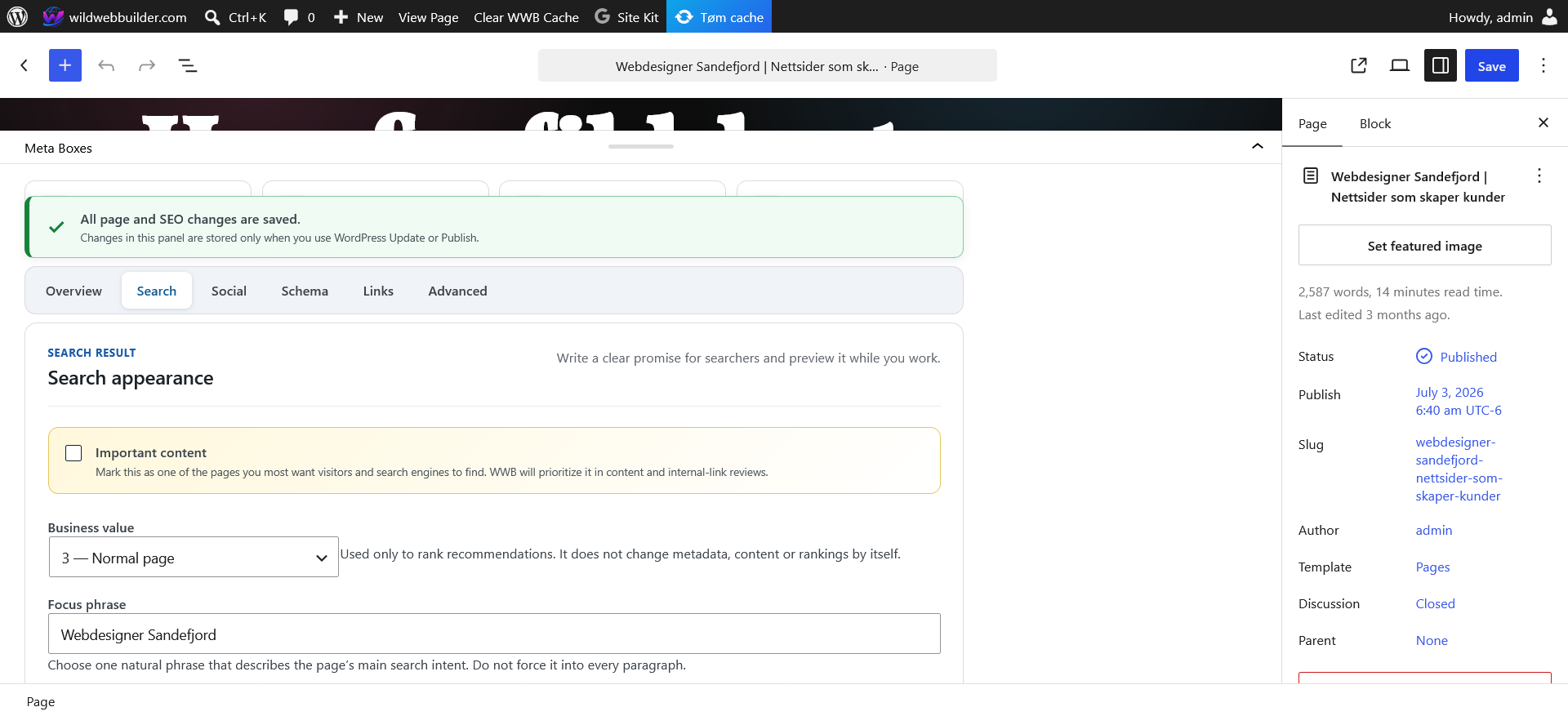
- SEO titles, descriptions, canonical URLs and robots directives.
- Open Graph and X metadata with featured-image fallback.
- Connected JSON-LD graphs and a guided schema builder.
- WordPress core XML sitemap integration and robots.txt controls.
- Internal redirects, automatic permalink-change redirects and loop protection.
- Privacy-safe 404 monitoring that discards query strings.
- Cached multilingual content audits and batched technical scans.
- Taxonomy SEO, breadcrumbs, internal-link suggestions and
/llms.txt. - Migration from WWB SEO V3, Yoast SEO, Rank Math, SEOPress and AIOSEO.
- Optional read-only Google Search Console reports and URL inspection.
- Optional AI Optimization Assistant and manual backlink candidate research.
AI features are disabled by default and run only after an authorized user clicks
the relevant action. WordPress 7.0 or newer uses the built-in, provider-agnostic
WordPress AI Client when a compatible connector supports the request. On older
WordPress versions, or when the native client cannot support the request, an
administrator can configure the backward-compatible OpenAI fallback. The plugin
still requires only WordPress 6.0 and does not require WordPress 7.0.
AI output is sanitized, bounded and review-only. It is never published, posted,
emailed or adopted automatically. Deactivation preserves all data. Deletion also
preserves data unless permanent cleanup is explicitly enabled in Settings.
External Services
This plugin has no licensing, update-check, advertising, analytics or telemetry
service. The following optional services are used only when a site administrator
configures and invokes their associated features.
WordPress AI Client and configured AI provider
On WordPress 7.0 or newer, the plugin first calls wp_ai_client_prompt(). The
WordPress AI Client selects a compatible AI provider from connectors installed
and configured by the site owner. WWB SEO does not install a connector and does
not control which provider the owner selects.
When an authorized editor manually requests page optimization, the prompt may
contain the site name, locale, saved page title, saved SEO/social metadata,
schema type and a bounded plain-text copy of the saved page content. When an
administrator manually requests backlink candidates, it may contain the site
name and URL, business goal, audience, location and up to eight recent public
page titles and URLs. That second request also asks a capable provider to use web
search. No prompt is sent automatically or in the background.
Data handling, retention, billing, terms and privacy are determined by the AI
connector and provider configured by the site owner. See the
WordPress AI Client documentation
and the selected connector/provider documentation before enabling this feature.
OpenAI fallback
The optional backward-compatible fallback sends manual AI requests to
https://api.openai.com/v1/responses. It is used only when the WordPress AI
Client is unavailable or cannot support the requested capability and a site
administrator has saved an OpenAI API key.
Page-optimization and backlink-candidate requests contain the same bounded data
described above. A pseudonymous HMAC identifier derived from the current local
user ID can also be sent for abuse prevention; it is not the WordPress username,
email address or raw user ID. Requests set store: false. Backlink research may
enable OpenAI web search. The encrypted API key remains on the WordPress site and
is transmitted only in the authorization header for the request. Nothing is sent
until an authorized user explicitly runs an AI action.
OpenAI API use is subject to OpenAI’s
terms and
privacy policy. API usage may be
billed to the key owner.
Google OAuth and Search Console
The optional Search Console module communicates with these Google endpoints:
https://accounts.google.com/o/oauth2/v2/authfor administrator-initiated OAuth consent.https://oauth2.googleapis.com/tokento exchange and refresh OAuth tokens.https://www.googleapis.com/webmasters/v3/for verified properties and read-only performance reports.https://searchconsole.googleapis.com/v1/urlInspection/index:inspectfor administrator-requested URL inspection.
The OAuth client ID, authorization code, encrypted client secret and encrypted
tokens are used for authentication. Selected property, date ranges, report
dimensions and administrator-entered inspection URLs are sent as needed. The
module requests the read-only webmasters.readonly scope. Performance results
are cached locally for one hour and inspection results for six hours. Disconnect
removes stored tokens and the selected property. Google use is subject to the
Google Terms of Service and
Google Privacy Policy.
Details




Related plugins
Plugins that also contain the tag content-analysis
Yoast SEO – Advanced SEO with real-time guidance and built-in AI

BoldGrid Easy SEO – Simple and Effective SEO

Semrush SEO Writing Assistant

Post Admin Word Count

SEOKEY – Powerful SEO plugin with Expert Insights and SEO Audit

Topic SEO Content Optimization Tool


About
Plugin for that tries to help you find the WordPress plugin you are looking for.
| Please enjoy an image of Crush (this awesome turtle) and have a lovely day! |  |
We do not own any plugin listed on this site and do not work for or work with WordPress.com or it's associated companies. We simply provide a searchable list of the available WordPress plugins.