


Yee Multi-User Account Switcher
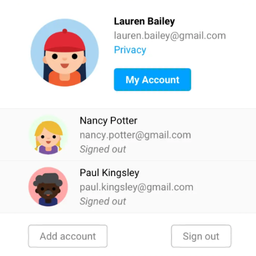
Account Dock lets a signed-in user add other accounts through the normal WordPress login screen, then switch between those verified sessions from the toolbar or account manager.
It is useful for customers, store managers, support teams, editors, administrators, and developers who regularly work with more than one account on the same site.
Main features
- Add up to five accounts after each account completes the normal WordPress authentication flow.
- Switch directly from the WordPress toolbar with an avatar, display name, username, and active-account indicator.
- Return to the same path and query string after switching from the toolbar.
- Manage accounts on a responsive account page with clear switch and remove actions.
- Use the
[account_dock]shortcode to display a link to the account manager. - Show a Manage accounts link on the WooCommerce My Account dashboard when WooCommerce is active.
- Preserve the Remember Me choice for each saved account.
- Validate expiration, cookie signatures, user identity, and server-side session revocation before every switch.
- Revoke a saved session when that account is removed.
- Revoke all sessions saved by Account Dock on this browser when the user logs out.
Account Dock never stores passwords, creates custom database tables, sends telemetry, or allows switching to an account that has not authenticated on the current browser.
Only one account is active at a time across the site’s tabs. Reload other open tabs after switching. Use separate browser profiles when accounts must remain active simultaneously.
Privacy
Account Dock stores essential browser cookies only after a user explicitly adds an account. The cookies contain WordPress-signed session credentials and a signed Remember Me preference. They are HttpOnly, use SameSite=Lax, and use the Secure flag when the site is accessed through HTTPS.
The plugin does not collect analytics or send account credentials to the plugin author.
Account avatars are rendered through the WordPress get_avatar() function. Depending on the site’s avatar configuration, the visitor’s browser may request an avatar from Gravatar and disclose normal connection information, such as the IP address and browser headers. The avatar URL uses a one-way hash derived by WordPress rather than sending the email address as plain text.
Gravatar service: https://gravatar.com/
Automattic privacy policy, which covers Gravatar: https://automattic.com/privacy/
Site owners should describe Account Dock’s essential cookies and configured avatar provider in their own privacy and cookie notices where required.
Security
Account actions use POST requests and WordPress nonces. Before switching, Account Dock verifies the signed authentication cookie, expected user ID, expiration, and server-side WordPress session token. Removing an account revokes the session token saved for that account.
Account Dock is a convenience tool for authenticated sessions, not an additional authentication factor. Use HTTPS in production and follow normal WordPress account-security practices.
Details


About
Plugin for that tries to help you find the WordPress plugin you are looking for.
| Please enjoy an image of Crush (this awesome turtle) and have a lovely day! |  |
We do not own any plugin listed on this site and do not work for or work with WordPress.com or it's associated companies. We simply provide a searchable list of the available WordPress plugins.