



YITH WooCommerce Featured Video
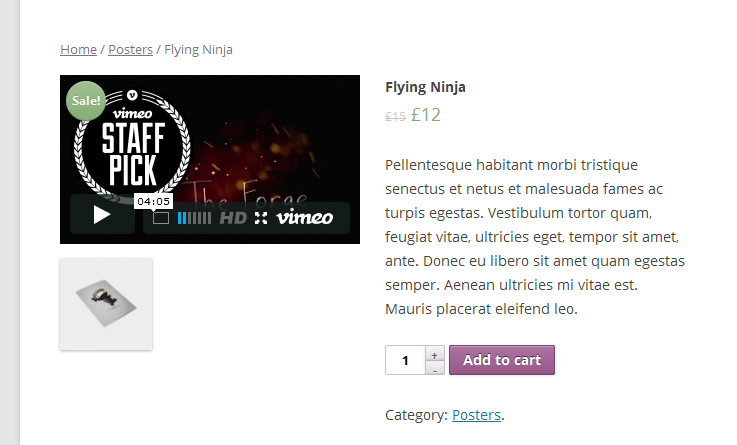
YITH WooCommerce Featured Video plugin is an extension for the WooCommerce plugin that allows your users to see a YouTube or Vimeo video instead of the featured image of the product detail page.
Add the URL of YouTube or Vimeo video in the specific field of the product configuration page and your customers will have the pleasure to watch something dynamic and cutomized.
For a more detailed list of options and features of the plugin, please read the official documentation.
Languages
Also available in:
- English
- Italian
Installation
Once you have installed the plugin, you just need to activate the plugin in order to enable it.
Configuration
YITH WooCommerce Featured Video will add a new submenu called “Featured Video” in “YIT Plugins” menu. From here you can configure all plugin settings.
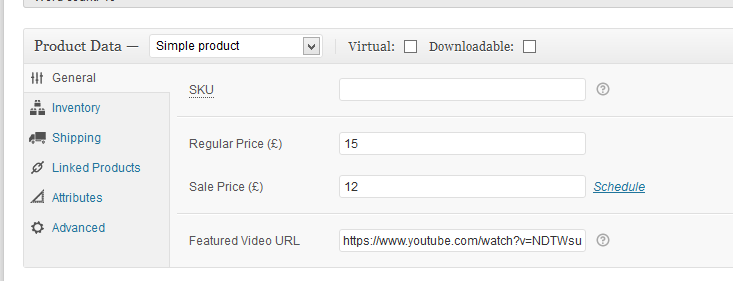
You will be able to add your video in your products following these steps:
- Open the configuration page of the product where you want to set the featured video;
- Set the URL of video in the “Featured Video URL” field, in the “Product Data” box.
Details
Related plugins
Plugins that also contain the tag featured
Featured Image from URL (FIFU)

Conditionally display featured image on singular posts and pages

Hide Featured Image

Featured Video Plus

Daddy Plus

WP Hide Show Featured Image


About
Plugin for that tries to help you find the WordPress plugin you are looking for.
| Please enjoy an image of Crush (this awesome turtle) and have a lovely day! |  |
We do not own any plugin listed on this site and do not work for or work with WordPress.com or it's associated companies. We simply provide a searchable list of the available WordPress plugins.