



ZA-ONE Site Watch
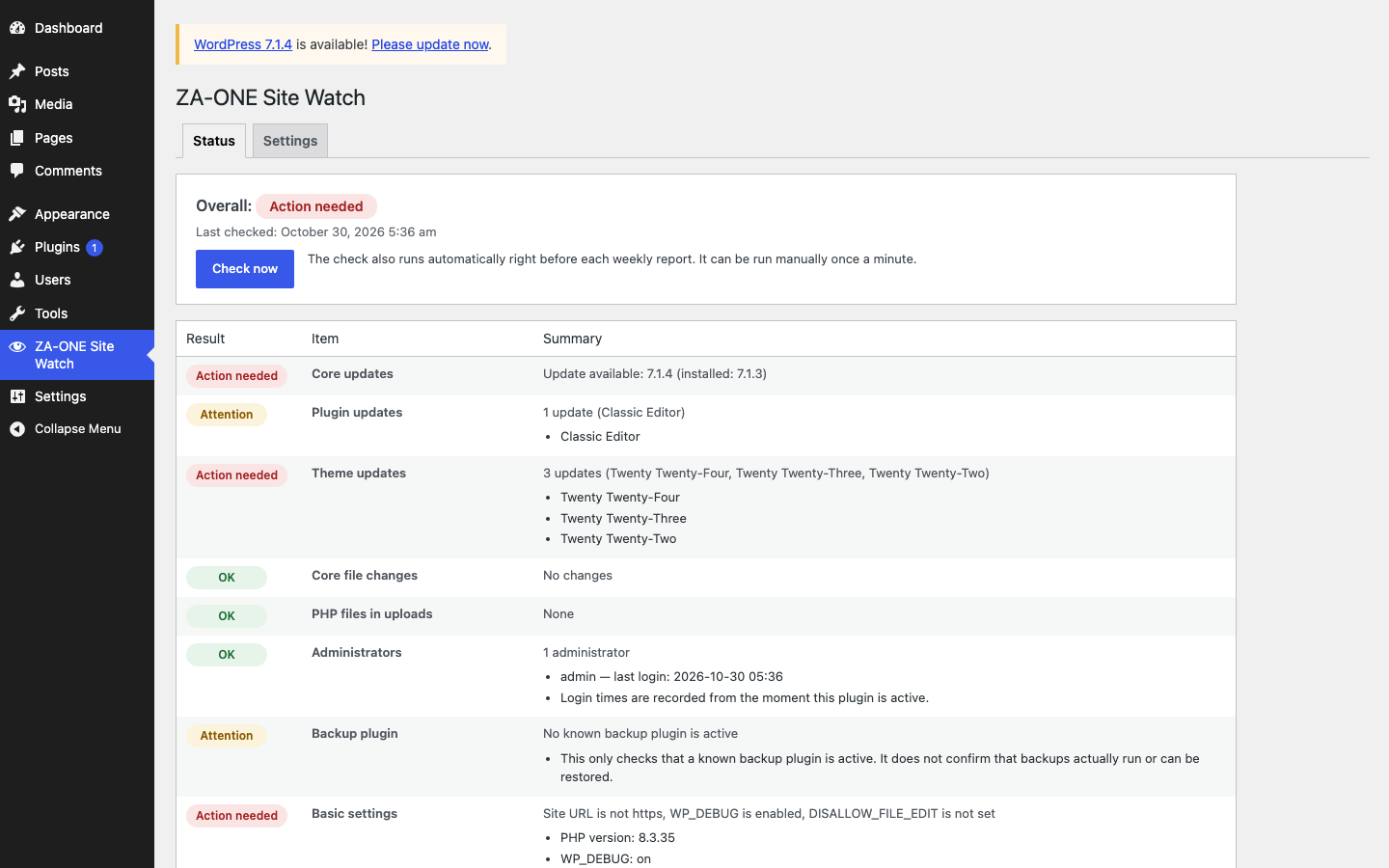
Know the state of your WordPress site without logging in every week. ZA-ONE Site Watch puts eight maintenance checks on one screen and sends a short weekly report to the place you already read — Slack, Discord, Telegram or email (any combination).
Each check is shown as OK / Attention / Action needed:
- Core updates — is WordPress itself up to date?
- Plugin updates — how many plugins have updates waiting, and which ones.
- Theme updates — the same for themes.
- Core file changes — compares your WordPress core files with the official checksums from WordPress.org and lists files whose content differs (
wp-content/is not included). - PHP files in uploads — lists
.php,.phtml,.php5and.pharfiles insidewp-content/uploads/, where they normally do not belong. - Administrators — every administrator with their last login time; flags accounts that have not logged in for 90 days, and sites with five or more administrators.
- Backup plugin — is a known backup plugin active?
- Basic settings —
WP_DEBUG,DISALLOW_FILE_EDIT, https for the site URL, and the PHP version.
A weekly report looks like this:
[Example Shop] Weekly report 2026-10-30 — Overall: Attention
✅ Core updates: Up to date (7.1.4)
⚠️ Plugin updates: 2 updates (Plugin A, Plugin B)
✅ Core file changes: No changes
…
What it does not do
ZA-ONE Site Watch only makes the status visible and reports it. It does not block traffic, change files, remove anything or update anything for you. Fixing is left to you (or to whoever maintains your site).
Features
- One screen — the “Status” tab shows the overall result, the last check time and the eight items with details.
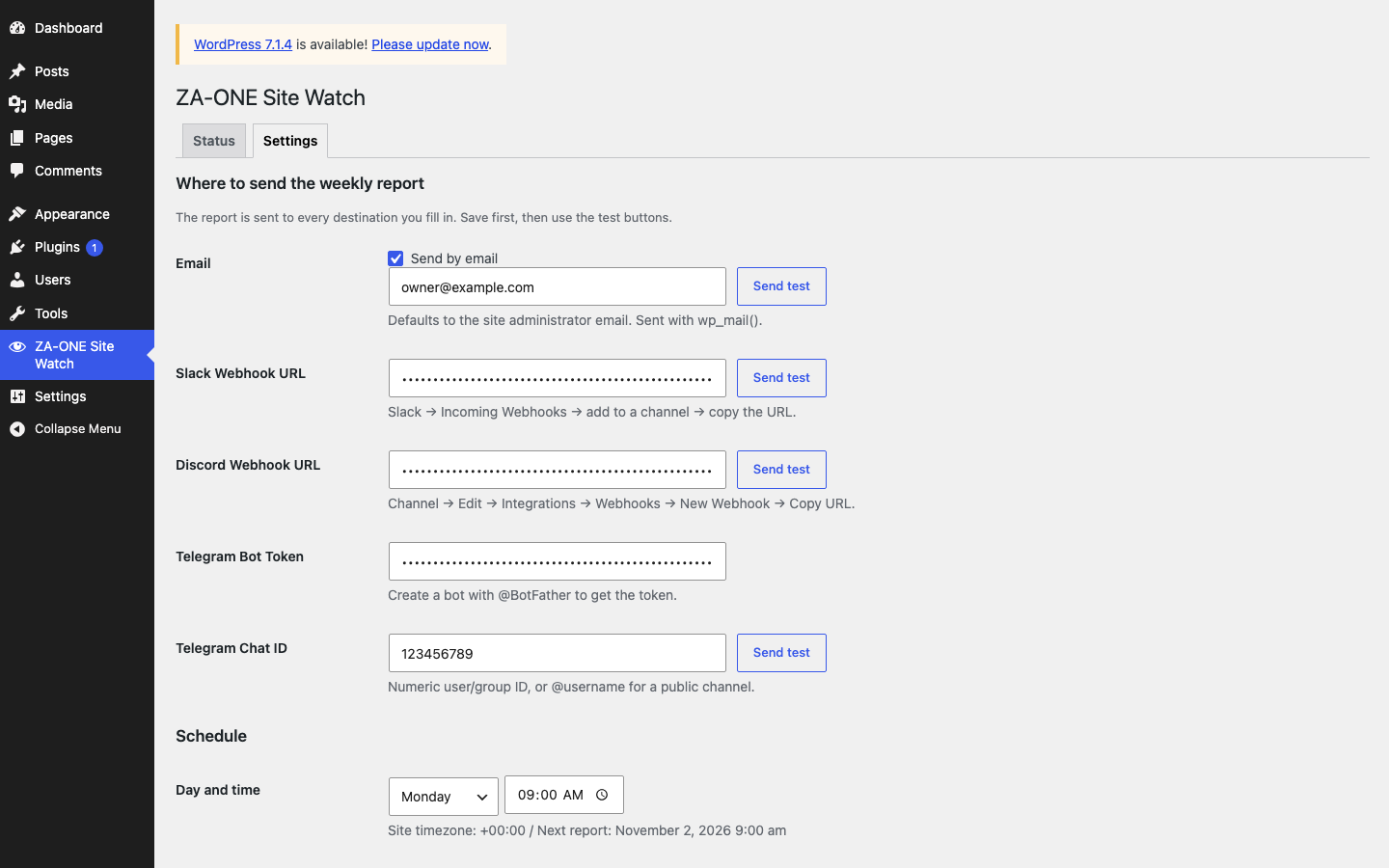
- Weekly report — choose the weekday and time (in your site’s timezone). The checks run right before the report is sent.
- Several destinations at once — email (via
wp_mail(), the administrator address by default), Slack Incoming Webhook, Discord Webhook, Telegram Bot. - Only when something changed — optional: skip the report when every result is the same as last time.
- Test buttons for each destination and a recent log (last 30 entries).
- One automatic retry 10 minutes after a failed delivery.
- Translation-ready. The Japanese translation is maintained on translate.wordpress.org.
- No account, no sign-up, no phone-home — the plugin never contacts the developer’s servers.
Privacy and data
The plugin creates no database tables. It stores its settings, the latest check result and a short log in WordPress options, and the last login time (a UNIX timestamp only — no IP address, no user agent) as user meta for administrators. Everything is removed when you delete the plugin.
Built by
ZA-ONE builds and maintains WordPress sites for small businesses in Japan. If you would rather have updates, backups and recovery handled for you, see zone-web.jp.
External services
This plugin connects to the following services. It never contacts the developer’s (ZA-ONE’s) servers; zone-web.jp appears only as a link on the settings tab.
- WordPress.org (
api.wordpress.org) — used for the “Core file changes” check. WordPress core’s ownget_core_checksums()function downloads the official checksums of your WordPress version from the core checksums endpoint (core/checksums/1.0/). What is sent: your WordPress version and locale. When: each time the checks run (weekly before the report, and when you click “Check now”); at most two requests per check (your site’s locale, anden_USwhen needed). See the WordPress.org Privacy Policy. - Slack (
hooks.slack.com) — only if you enter a Slack Incoming Webhook URL. What is sent: the weekly report text: site name, date, the eight results, the URL of this plugin’s admin screen (the “Details” line), the WordPress and PHP versions, names of plugins and themes with updates and of the active backup plugin, names of changed core files and of PHP files found in uploads, and the display names of administrators who have not logged in for 90 days or more (or have no recorded login). No form data or other personal data. When: once a week, when you click “Send test”, and one retry after a failure. See the Slack Privacy Policy and Slack Terms of Service. - Discord (
discord.com) — only if you enter a Discord Webhook URL. Same content and timing as Slack. See the Discord Privacy Policy and Discord Terms of Service. - Telegram (
api.telegram.org) — only if you enter a bot token and chat ID. Same content and timing as Slack. See the Telegram Privacy Policy and Telegram Terms of Service. - Email — sent with WordPress’s
wp_mail()through your own server’s mail setup. This is not an external service run by the plugin.
日本語
本プラグインの外部通信は次のとおりです。開発元(ZA-ONE)のサーバーへの通信は一切ありません。zone-web.jp は設定タブのリンクとしてのみ表示されます。
- WordPress.org(
api.wordpress.org) — 「コアファイルの変更」の確認のため、WordPress 本体のget_core_checksums()で、WordPress 本体の checksum 用エンドポイント(core/checksums/1.0/)から公式のチェックサムを取得します。送るのは WordPress のバージョンとロケールだけです。確認を実行するたび(週報の直前と「今すぐ確認」)に通信し、1 回の確認で最大 2 回(サイトのロケールと、必要なときの en_US)です。プライバシーポリシー - Slack(
hooks.slack.com) — Webhook URL を入力した場合のみ。送るのは週報の本文(サイト名・日付・8 項目の判定・このプラグインの管理画面 URL(「詳細」の行)・WordPress と PHP の版・更新のあるプラグイン/テーマ名と有効なバックアップ用プラグイン名・変更のあったコアファイル名と uploads で見つかった PHP ファイル名・90 日以上ログインのない(または記録のない)管理者の表示名)で、フォームの値などの個人情報は含みません。週 1 回、テスト送信時、失敗時の再送 1 回。プライバシーポリシー / 利用規約 - Discord(
discord.com) — Webhook URL を入力した場合のみ。内容とタイミングは Slack と同じ。プライバシーポリシー / 利用規約 - Telegram(
api.telegram.org) — Bot トークンとチャット ID を入力した場合のみ。内容とタイミングは Slack と同じ。プライバシーポリシー / 利用規約 - メール — WordPress の
wp_mail()で、お使いのサーバーのメール設定から送ります。プラグインが使う外部サービスではありません。
よくある質問(日本語の補足):
- 認識するバックアップ用プラグイン — UpdraftPlus・BackWPup・All-in-One WP Migration・Jetpack VaultPress Backup(Jetpack 本体が有効な場合も OK と数えます)・WPvivid・Solid Backups(BackupBuddy)・Duplicator。
- 管理者の「記録なし」 — 有効化後にまだログインしていない管理者は、90 日以上ログインなしと同じ扱いで「注意」になります。
- マルチサイト — サイト単位で動きます。ネットワーク有効化は未検証です。
Details

Related plugins
Plugins that also contain the tag maintenance
Hostinger Tools

Maintenance

WP Maintenance

XO Security

Error Log Monitor

Under Construction, Coming Soon & Maintenance Mode


About
Plugin for that tries to help you find the WordPress plugin you are looking for.
| Please enjoy an image of Crush (this awesome turtle) and have a lovely day! |  |
We do not own any plugin listed on this site and do not work for or work with WordPress.com or it's associated companies. We simply provide a searchable list of the available WordPress plugins.