

Zorachat – AI Chatbot, Live Chat & WooCommerce Assistant
Let AI handles customer engagement. Bring in a real person when human judgment matters.
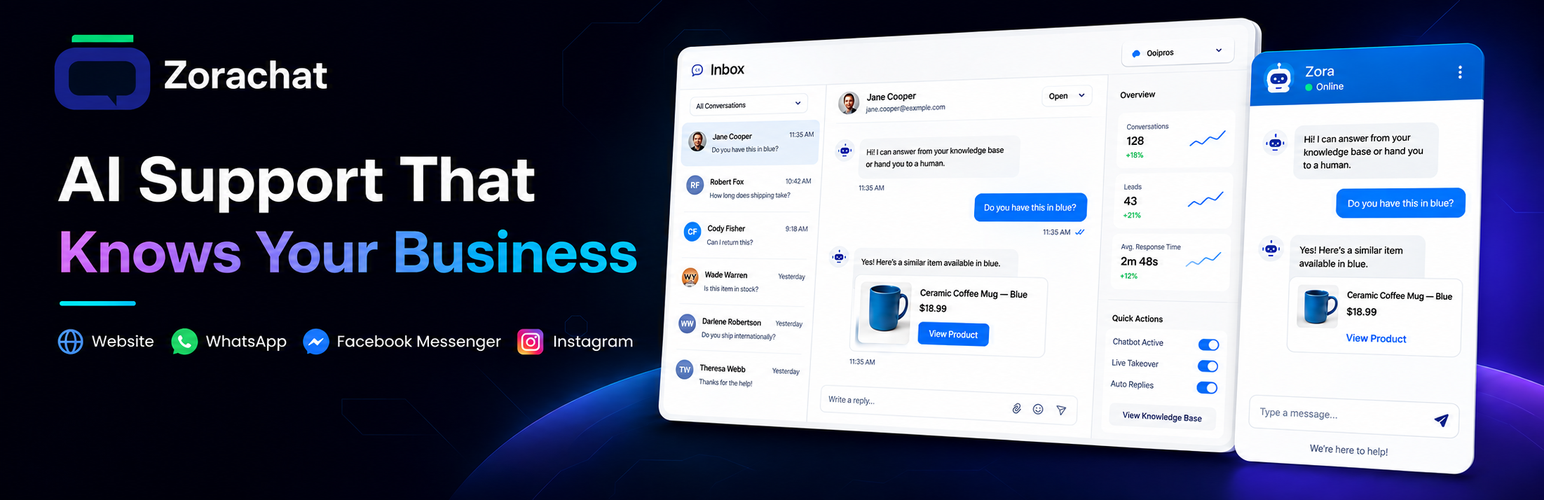
Zorachat turns your WordPress content into an AI customer-support assistant that can answer visitor questions, recommend WooCommerce products, capture leads, and keep conversations moving around the clock.
When a conversation needs a personal touch, your team can reply, take over from the AI, and return the chat to AI afterward—without making the visitor start again. Takeover is available from the WordPress Inbox or through the Zorachat Live Agent app for iOS and Android.
It is more than a chatbot. It is a practical AI-and-human support workflow built directly into WordPress.
Why Choose Zorachat?
- Answers grounded in your business – Use WordPress pages, posts, PDFs, FAQs, custom knowledge, and WooCommerce product information to guide replies.
- AI and human support in one conversation – Review chats in the local WordPress Inbox, reply, take over when needed, and return the conversation to AI afterward.
- Local support tools included – The Inbox, agent replies, takeover controls, Leads, and Analytics.
- Built to generate opportunities – Capture visitor details naturally during conversations and manage them from a dedicated Leads page.
- WooCommerce product recommendation – Your assistant understands shopper intent—not just product-name searches—and recommends relevant products based on each customer’s needs and your store’s product information.
- Conversational Cart Management – Shoppers can add products to their cart directly from the conversation. For variable products, the assistant prompts them to choose required options such as size or colour before adding the item.
- Your choice of AI setup – Bring an OpenAI, Google Gemini, or Anthropic Claude API key, or use Zorachat Cloud with no provider API key required.
- Useful insights without leaving WordPress – Review conversation activity and lead information from dedicated Inbox, Leads, and Analytics pages.
- Multilingual support – The assistant understands and responds in the customer’s language, helping businesses support a wider audience without creating separate chat experiences.
- Local conversation records – Conversation and lead records are stored in your site’s WordPress database.
- Designed for your brand – Customize the assistant and chat widget to fit your website.
- Lightweight Widget Engineering – The responsive chat widget is engineered for fast, efficient loading with minimal impact on website performance across desktop and mobile devices.
From Instant Answers to Human Help
Most visitor questions do not need a support agent. Some absolutely do.
Zorachat gives you both:
- The AI responds instantly using the knowledge you have provided.
- The conversation is captured in your WordPress Inbox so you can review what visitors are asking.
- Lead details are collected conversationally when a visitor shows interest or needs follow-up.
- A human can reply or take over from the wordpress Inbox when the question requires empathy, judgment, negotiation, or hands-on support.
- The conversation can return to AI once the human has finished.
Visitors get speed without losing access to a real person. Your team spends less time repeating routine answers and more time on conversations where people make the difference.
Train the Assistant on What Your Business Knows
Zorachat can use knowledge made available from:
- WordPress pages
- WordPress posts
- WooCommerce products
- PDF documents
- Frequently asked questions
- Custom knowledge entries
This helps the assistant give responses that are relevant to your products, services, policies, and website instead of relying only on general AI knowledge.
WooCommerce AI Shopping Assistance
When WooCommerce is active, Zorachat can use product information provided by your store to answer product questions and help visitors find suitable items.
Use it to support conversations such as:
- “Which product is best for my needs?”
- “What is the difference between these options?”
- “Do you have something within my budget?”
- “Where can I learn more about this product?”
WooCommerce is optional. Zorachat also works for service businesses, SaaS websites, agencies, schools, membership sites, publishers, and other WordPress websites.
Conversational Lead Capture
Turn helpful conversations into real business opportunities.
Zorachat can collect and qualifies leads naturally within the chat, while conversation and lead records remain available in your WordPress dashboard. The dedicated Leads page gives your team useful context for follow-up instead of a name or email with no understanding of what the visitor wanted.
The Analytics page helps you understand activity and performance without moving your core conversation data out of WordPress.
Local Inbox and Human Takeover
AI is fast, but it should not trap a customer in automation.
Authorized WordPress users can review conversations, reply to visitors, take over from the AI, and use one action to end the takeover and return the chat to AI—all from the local WordPress Inbox. The Inbox uses manual refresh and does not require a Zorachat Cloud connection.
For teams that need remote access, Zorachat Cloud Services adds real-time mobile live-agent monitoring, push notifications, and centralized access to the same conversations.
This creates a smooth support experience: the assistant handles repetitive questions, while your team remains available for sensitive, complex, or high-value conversations.
Image-Aware Conversations
When enabled and supported by the selected service, visitors can share images as part of a conversation. This can provide useful visual context for product questions, support requests, or issue reporting.
Choose How You Power the AI
Zorachat supports two setup paths:
Bring your own API key
Connect a supported provider using your own API key:
- OpenAI
- Google Gemini
- Anthropic Claude
Use Zorachat Cloud Services
Connect to Zorachat Cloud and use managed AI replies with Zorachat Cloud Credits. No separate provider API key is required for this option. Zorachat Cloud also adds real-time mobile live-agent monitoring, push notifications, and centralized remote conversation access.
You choose the setup that best fits your business.
Key Features
- AI-assisted answers based on knowledge from your WordPress website
- WordPress page and post knowledge
- PDF knowledge ingestion
- Custom knowledge entries and FAQs
- WooCommerce product-aware responses
- Conversational lead capture
- Local WordPress conversation Inbox with manual refresh
- Local agent replies, human takeover, and return-to-AI controls
- Dedicated local Leads and Analytics pages
- Conversation and lead records stored in WordPress
- Configurable assistant and chat widget
- OpenAI, Google Gemini, and Anthropic Claude support
- Optional managed AI through Zorachat Cloud Services
- Optional real-time mobile live-agent monitoring, push notifications, and centralized remote access
- Optional image-aware conversations
Get Started in Minutes
- Install and activate Zorachat.
- Open Zorachat in your WordPress dashboard.
- Choose your AI provider or connect to Zorachat Cloud Services.
- Add or review the knowledge your assistant can use.
- Customize and preview the chat widget.
- Launch your assistant and start helping visitors.
- Review conversations, leads, and analytics from your WordPress dashboard.
Data Storage and Processing
Conversation and lead records created by the plugin are stored in your WordPress database.
Local storage does not mean local-only processing. To generate a response, the plugin sends the visitor’s message and relevant instructions or knowledge context to the AI service selected by the administrator. See External Services below for full details.
External Services
Zorachat uses external services only for features an administrator enables. All AI requests, including requests made with an administrator-supplied OpenAI, Gemini, or Anthropic API key, are sent first to api.zorachat.ai and relayed to the selected provider. Both Zorachat and that provider therefore process the request data. Conversation and lead records remain stored in the site’s WordPress database.
Zorachat API relay
This relay is used whenever OpenAI, Gemini, or Anthropic is selected. The plugin sends the selected provider, the provider API credential required to authenticate the request, the visitor’s message, assistant instructions, relevant website, knowledge-base, FAQ, or WooCommerce context, and request metadata to api.zorachat.ai. Zorachat forwards the credential and request data to the selected provider and returns the generated reply to the site.
Purpose: to route the request to the selected provider and return its response.
API endpoint: https://api.zorachat.ai/
Terms: https://wordpress.zorachat.ai/terms-and-conditions
Privacy Policy: https://wordpress.zorachat.ai/privacy-policy
Zorachat Cloud Services
Zorachat Cloud Services is Zorachat’s optional hosted service for managed AI replies, real-time mobile live-agent monitoring, push notifications, centralized remote access, account management, and plan management. Local Inbox, replies, takeover, Leads, and Analytics functionality remains available in WordPress without a Cloud connection.
This service is used only when an administrator chooses to connect to Zorachat Cloud.
Data sent when connecting or managing the service: the site URL, site name, company name, and administrator email address.
Data sent during use: visitor messages, assistant instructions, website and knowledge-base context, WooCommerce context if enabled, generated replies, lead information entered in the chat, enabled attachments, and conversation metadata.
Why the data is sent: to generate replies, provision and validate Zorachat Cloud Credits, sync knowledge content, support mobile monitoring and notifications, prevent abuse, and manage billing or credit usage.
Service: https://api.zorachat.ai/
Terms: https://wordpress.zorachat.ai/terms-and-conditions
Privacy Policy: https://wordpress.zorachat.ai/privacy-policy
OpenAI API
Used only when an administrator selects OpenAI and provides an OpenAI API key. The key and request data described under Zorachat API relay are sent through api.zorachat.ai and forwarded to OpenAI to generate the reply.
Service: https://openai.com/api/
Terms: https://openai.com/policies/services-agreement/
Privacy Policy: https://openai.com/policies/privacy-policy/
Google Gemini API
Used only when an administrator selects Gemini and provides a Gemini API key. The key and request data described under Zorachat API relay are sent through api.zorachat.ai and forwarded to Google to generate the reply.
Service: https://ai.google.dev/gemini-api
Terms: https://ai.google.dev/gemini-api/terms
Privacy Policy: https://policies.google.com/privacy
Anthropic Claude API
Used only when an administrator selects Anthropic and provides an Anthropic API key. The key and request data described under Zorachat API relay are sent through api.zorachat.ai and forwarded to Anthropic to generate the reply.
Service: https://www.anthropic.com/api
Terms: https://www.anthropic.com/legal/commercial-terms
Privacy Policy: https://www.anthropic.com/legal/privacy
Privacy
Zorachat stores plugin settings, conversation records, and captured lead records in the WordPress database. Depending on the configuration, chat content and related context are transmitted to the selected external service for processing as described above.
Site administrators are responsible for:
- Providing an appropriate privacy notice to visitors
- Responding to requests to access, correct, export, or erase personal data
- Reviewing the terms and privacy practices of every enabled external service
Credits
This plugin includes the following third-party library:
- Smalot PDF Parser – Used to extract text from PDF documents for knowledge indexing. Developed by Smalot and licensed under the MIT License. Learn more at the Smalot PDF Parser GitHub repository: https://github.com/smalot/pdfparser
Details


Related plugins
Plugins that also contain the tag ai-chatbot
MxChat – AI Chatbot & Content Generation for WordPress

Live Chat & AI Chatbots – onWebChat

AI Product Tools – Bulk Product Content Generator & AI Toolkit for WooCommerce
AI Chatbot for WordPress by Customerly

Social Intents – Live Chat

Muchat – AI Chatbot (with Autosync)


About
Plugin for that tries to help you find the WordPress plugin you are looking for.
| Please enjoy an image of Crush (this awesome turtle) and have a lovely day! |  |
We do not own any plugin listed on this site and do not work for or work with WordPress.com or it's associated companies. We simply provide a searchable list of the available WordPress plugins.